The Problem#
After months of building Claude Code extensions – agents, skills, commands, hooks, MCP servers – I had a growing collection of powerful tools with no coherent entry point. Want to pull all repos? Run a shell script. Want to check infrastructure health? Ask Claude and hope it knows which command to use. Want to automate a browser task? Figure out whether to use the MCP plugin or write a script.
Every new capability added more cognitive load. The tools were good individually, but the system was incoherent.
The Inspiration#
IndyDevDan’s Bowser framework introduced a clean mental model: composable layers where each has a single responsibility and can be entered independently. His stack was designed for browser automation, but the pattern is universal.
The insight: you don’t need one tool that does everything. You need layers that compose.
The Architecture#
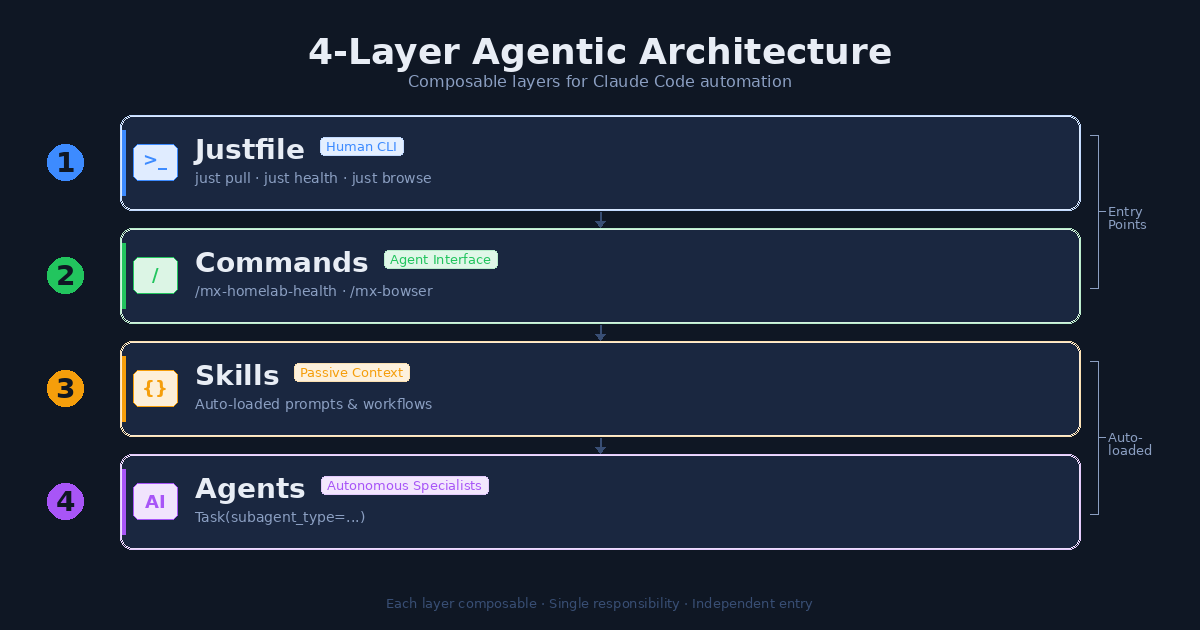
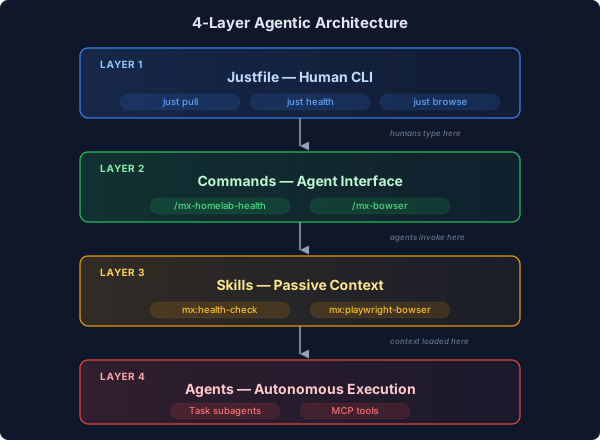
Four layers, each with a clear boundary:
Layer 1: Justfile (Human CLI)#
Just is a command runner – think make without the build system baggage. A single justfile at the workspace root wraps all existing shell scripts and adds new utilities:
| |
Key decision: The justfile wraps existing scripts – it doesn’t replace them. just pull calls ./start-pull-all-repos.sh under the hood. Zero migration cost, instant unified interface.
Layer 2: Commands (Agent Interface)#
Commands are markdown files with YAML frontmatter that define structured prompts for Claude. They’re the bridge between human intent and agent execution:
/mx-homelab-health pihole-ha– Parse a YAML health check story, SSH into servers, run checks, report pass/fail/mx-bowser homelab-services– Parse a browser story YAML, write Playwright scripts, execute, report results
Commands are imperative – they tell the agent exactly what to do and how to report results.
Layer 3: Skills (Passive Context)#
Skills are knowledge that Claude loads automatically when it detects relevance. They don’t execute anything – they inform:
mx:health-checktriggers on “homelab health”, “service status” – tells Claude about the YAML story systemmx:playwright-bowsertriggers on “browse website”, “take screenshot” – tells Claude to prefer CLI over MCP
Skills are declarative – they teach the agent what’s available and how it works.
Layer 4: Agents (Autonomous Execution)#
The actual execution layer – Claude’s Task tool spawning specialized subagents, MCP server tools, or direct Bash commands. This layer already existed; the architecture just makes the entry points clearer.
YAML-Driven Stories#
Both health checks and browser automation use the same pattern: declarative YAML files that describe what to check, not how to check it.
Infrastructure Health Checks#
| |
Four stories cover the critical infrastructure: Pi-hole HA, Caddy HA, Proxmox cluster, and Docker service stacks. Each story defines targets (hosts) and checks (commands with expected output).
Browser Automation Stories#
| |
Same idea, different domain. The orchestrator command reads the YAML, generates a Playwright script, executes it, and reports results.
CLI-First Browser Automation#
This was the most interesting design decision. The Bowser framework’s insight: MCP tool calls carry schema overhead that burns tokens. Every browser_navigate, browser_click, browser_snapshot call includes the full tool schema in the conversation context.
The alternative: write a Playwright script to /tmp/pw-task.mjs and run it with node. One Bash call instead of 5-10 MCP calls. Same Playwright engine, dramatically fewer tokens.
| |
The createRequire pattern is worth noting – it solves a WSL2-specific problem where npm install -g needs root permissions. Instead, Playwright lives in a local project directory, and scripts resolve it via Node’s module system.
MCP mode is kept as a fallback for when you need interactive DOM inspection or step-by-step debugging. Two modes, one engine, pick the right one for the task.
What I Learned#
Layers compose better than monoliths#
The temptation with AI tools is to build one mega-skill that handles everything. The 4-layer approach works better because each layer can evolve independently. Adding a new health check? Just drop a YAML file. New browser test? Same pattern. No skill code changes needed.
Declarative beats imperative for story-driven automation#
YAML stories are the real unlock. They’re version-controlled, diffable, reviewable, and composable. The same pattern works for infrastructure health, browser testing, and potentially deployment validation, security scanning, or backup verification.
Token efficiency matters in agentic workflows#
Every MCP tool call in the conversation context costs tokens. For repetitive operations (navigate, click, fill, assert), writing a script and executing it once is dramatically cheaper than individual tool calls. The CLI-first pattern isn’t just faster – it’s cheaper.
Wrap, don’t replace#
The justfile wraps existing shell scripts instead of rewriting them. This is the right approach for introducing a new layer – zero migration risk, immediate value, and the old tools still work exactly as before.
What’s Next#
The YAML story pattern could extend to:
- Deployment validation stories – verify a service is healthy after deploy
- Security audit stories – check SSL certs, open ports, firewall rules
- Backup verification stories – confirm backup freshness and restorability
Each would follow the same pattern: YAML definition, command orchestrator, skill for context, justfile recipe for humans.