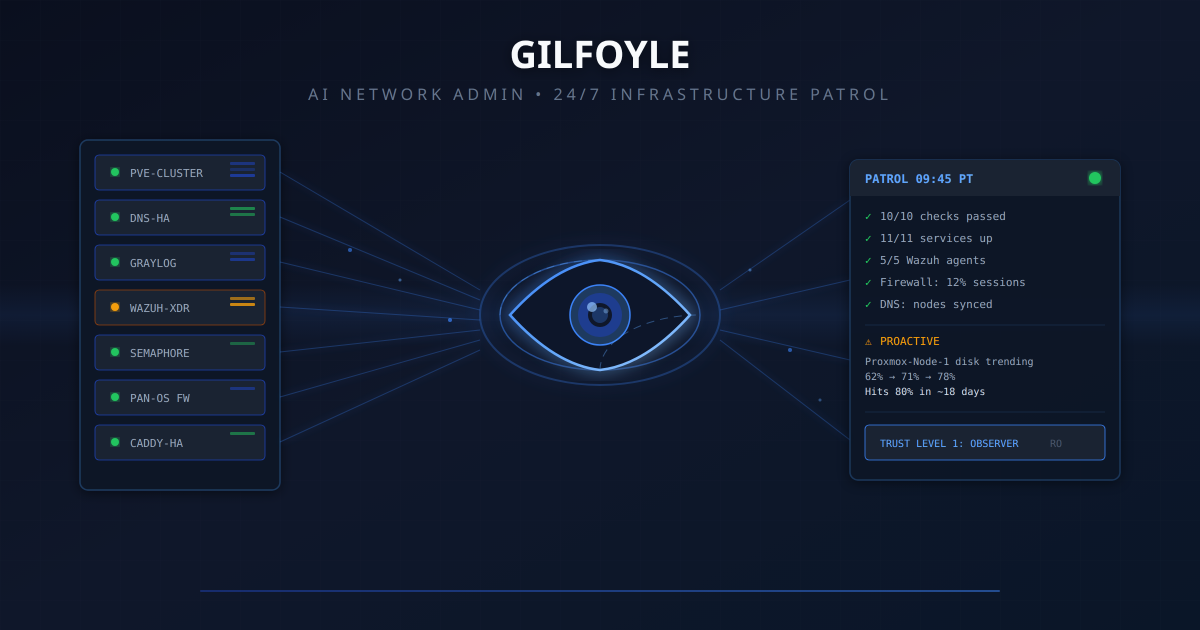
Update, October 14, 2026. The patrols, capabilities, and trust ladder below describe Gilfoyle’s April rollout. A Level 4 policy now defines bounded authority for single-service repairs with a known rollback and fault-specific checks. The unattended controller remains inactive. Verification showed that a fresh session on the Discord route loaded the October 14 policy; already-warm sessions can retain their older prompts. The next chapter explains what changed and what still needs verification.
For the current system from alert intake through tools, memory, scheduling, and repair boundaries, read How Gilfoyle Works.
Correction, September 2026. The tool-access story in this post drifted from reality. The
:8100REST layer described below was decommissioned 2026-06-17. Records show it was never operationally provisioned in the first place. The verified access path for that correction was the homelab-mcp CLI: up to 25 read-only tools across 10 configured backends, no write tools at all. The IPAM backend is Nautobot (NetBox retained rollback-only). The agent design, patrols, and the false-positive incident below are unchanged history; only the tool-transport claims needed correcting.
The Problem: Nobody’s Watching at 3 AM#
My homelab runs 47 guests across 4 Proxmox nodes, with HA pairs for DNS and reverse proxy, a Wazuh XDR deployment, centralized logging in Graylog, and CI/CD automation through Semaphore. It’s a lot of infrastructure for one person to monitor.
I had alerts. Grafana fires when RAM hits 75%. Wazuh flags suspicious file changes. n8n emails me when workflows fail. But alerts are reactive. They tell you something broke. They don’t tell you something is about to break.
What I wanted was an on-call network admin. Someone who checks everything four times a day, correlates alerts across services, spots trends before they become incidents, and wakes me up only when it actually matters.
So I hired Gilfoyle.
Who Is Gilfoyle?#
Named after the paranoid, competent sysadmin from Silicon Valley, Gilfoyle is an AI agent running on Hermes, an open-source AI gateway that connects LLMs to messaging platforms with built-in tool execution, session management, and security controls.
At the April launch, Gilfoyle lived on a dedicated LXC in my Proxmox cluster, monitored 20 Discord channels, and had access to read-only infrastructure tools. He ran infrastructure patrols four times a day, triaged alerts, generated daily and weekly reports, and stayed in character while doing it. The September correction above clarifies the tool-access path.
That first version was an observer by policy and needed my explicit approval before touching a single container. More on that later.
The MCP Connection#
In a previous post, I built a unified MCP server that wraps my homelab services behind one read-only interface — see that post’s September 2026 correction for the current inventory: local stdio plus a CLI, up to 25 read-only tools across 10 configured backends, 15 documentation resources.
That MCP server became Gilfoyle’s nervous system. Every patrol check, every alert triage, every health query flows through it. When Gilfoyle checks if “anything is broken,” he’s calling the same service_health tool that runs parallel checks across all configured services via asyncio.gather().
An earlier draft of this post described a REST API layer on port 8100 that supposedly extended the MCP server to 34 tools across 11 services. That layer was never operationally provisioned and was formally decommissioned 2026-06-17. Gilfoyle’s actual access path is plainer and safer: the homelab-mcp-cli entry point, invoking the same read-only tools, with IPAM queries served by Nautobot since it replaced NetBox.
What Gilfoyle Did in April#
12 Capabilities in the Original Setup#
| # | Capability | Schedule | What It Does |
|---|---|---|---|
| 1 | Alert monitoring + triage | Always-on | Classifies severity, investigates, recommends action |
| 2 | Email management | Gmail poll every 5 min | Classifies, routes urgent to Discord, marks spam as read |
| 3 | Daily infrastructure report | 8 AM PT | 24h summary across 16 Discord channels with trends |
| 4 | Weekly capacity planning | Monday 8:30 AM | Prometheus queries for disk/RAM/CPU trends with projections |
| 5 | Runbook generation | Opportunistic | Auto-creates runbooks when alerts fire and resolve |
| 6 | n8n workflow investigation | On error | Queries n8n API for actual failed node and error message |
| 7 | Homelab MCP tools | Always-on | Up to 25 read-only tools across 10 backends via the homelab-mcp CLI |
| 8 | Email monitor | Every 30 min | Gmail label:Homelab, classifies and posts to Discord |
| 9 | Infrastructure patrol | Every 6 hours | 10-check sweep across all systems |
| 10 | Alert correlator | Always-on | Severity-gated enrichment with cross-source correlation |
| 11 | cc-discord health check | On demand + patrol | Checks gateway service status, can restart with approval |
| 12 | Semaphore CI/CD health | Daily 9 AM | Task failures, schedule gaps, missing cron jobs |
The Infrastructure Patrol#
This was where it got interesting. Four times a day (03:45, 09:45, 15:45, 21:45 PT), Gilfoyle ran a 10-check sweep:
- Prometheus alerts: anything currently firing
- Backup health: failed PBS jobs in the last 24h
- Service health: all 11 services reachable
- Graylog error spikes: error rate vs baseline in the last 6h
- Firewall posture: PAN-OS interfaces, HA status, session count
- Certificate expiry: ACME cert monitoring
- Semaphore failures: failed CI/CD tasks since last patrol
- DNS consistency: A records pointing to stopped or destroyed guests
- Wazuh security: disconnected agents, high-level alerts, FIM changes
- cc-discord gateway: bot service uptime, memory, restarts
Here’s what a real patrol looks like. This is from April 17, the 09:45 PT patrol that caught a genuine critical issue. Hostnames are replaced with role labels:
PATROL 09:45 PT | 1 critical, 0 warning, 0 info
Services: Prometheus 0 firing | Caddy HA healthy | Pi-hole HA healthy | Semaphore 0 failed | n8n 22 active | Graylog 0 errors | Firewall 737 sessions (0.4%)
Security: Wazuh 5/6 agents | Workstation still asleep
DNS: 98 records, both Pi-hole nodes in sync
CRITICAL: cc-discord crash loop on Agent-Gateway
cc-discord is down and restarting repeatedly. Watchdog timeout at 09:38, 71 restarts since then. Current state:
activating (auto-restart).Context:
- Last stable uptime was ~5.8h before this crash
- Memory at 999 MB used, only 24 MB available
Options:
- Restart:
cc-discord-ctl.sh restart- Full reset if restart fails:
cc-discord-ctl.sh reset- Check logs:
cc-discord-ctl.sh logs
And a quiet patrol. Most of them look like this:
PATROL 03:45 PT | ✅ All clear
Services: Prometheus 0 firing | Caddy HA healthy | Pi-hole HA healthy | Semaphore 0 failed | n8n 5 active | Graylog 0 errors
Firewall: PA-440, 833 sessions (0.4%), uptime 41d
Security: Wazuh 5/6 agents | cc-discord running
Nothing requires action.
Smart Rate Limiting#
Gilfoyle doesn’t spam. Four layers of rate limiting prevent alert fatigue:
| Layer | Trigger | Behavior |
|---|---|---|
| Dedup | Same alert within 24h | One-liner: “4th occurrence, same root cause” |
| Cascade | 3+ alerts in 30 min | Groups under root cause, single report |
| Tool budget | 30 calls per patrol | Stops enriching, posts partial findings |
| Cooldown | After cascade | 60 min before new alerts break through |
Severity-Gated Triage#
Not all alerts get the same investigation depth:
- Info/Resolved: one-line acknowledgment, zero extra tool calls
- Warning: light enrichment with Prometheus metrics + Graylog errors (2-3 calls)
- Critical: deep investigation across Prometheus + Graylog + service health + Semaphore + backups + DNS + Wazuh (6-8 calls)
This keeps token costs reasonable while ensuring critical issues get thorough cross-source correlation.
Security: Trust Levels and LLM Guardrails#
Giving an AI agent access to your infrastructure sounds terrifying. It should. Here’s how I made it not terrifying.
The Trust Level System#
The original design used an explicit trust hierarchy, borrowed from how real organizations onboard sysadmins:
| Level | Role | Can Do |
|---|---|---|
| 1: Observer | Monitor + classify + recommend | Read dashboards, classify alerts, suggest actions |
| 2: Advisor | All of L1 + read-only diagnostics | Run docker ps, df -h, free -h on servers |
| 3: Operator | All of L2 + restart with approval | Restart one service at a time, after explicit approval |
| 4: Admin | All of L3 + config changes with approval | Modify configurations, deploy changes |
In April, Gilfoyle operated at Level 1: Observer. The policy allowed investigation and recommendations, with execution requiring my explicit approval. Trust was meant to be earned over time, not granted by default. The October policy has a different boundary, covered in the next chapter.
Hard Rules (Never Break These)#
Written directly into Gilfoyle’s original April agent instructions:
- READ-ONLY by default. No infrastructure changes without approval.
- NEVER delete a host, VM, LXC, or container. Absolute prohibition.
- NEVER run destructive commands. No
rm -rf,pct destroy,qm destroy,DROP TABLE. - When in doubt, ask. Always better to ask than to guess.
The Approval Workflow#
The original approval protocol was:
- State the problem. What alert fired, what was observed.
- Recommend the action. Specific commands or steps.
- Explain the risk. What could go wrong.
- Wait for approval. Do NOT proceed until I say yes.
- Execute exactly what was approved. Nothing more.
- Report the result. Confirm what happened.
The original version of this section mapped the approval workflow onto the MCP server’s confirm=true gate. The September correction established that this interface had no write tools. Infrastructure changes needed a separate execution path through the owning system (Semaphore, Proxmox, or the DNS pipeline). A read-only interface constrains that interface; it does not prove that every other action path is read-only.
Hermes Security Layers#
The April design also relied on Hermes security controls:
Access control before intelligence:
- DM pairing. Unknown senders must be explicitly approved before the bot responds.
- Channel allowlists. Gilfoyle only monitors specific homelab channels, ignores everything else.
- Mention gating. In group channels, only responds when @mentioned (except his dedicated inbox).
Tool policy and sandboxing:
- Tool deny lists. Dangerous tools (
gateway,cron,sessions_spawn) are blocked by default. - Scoped MCP access. The corrected interface exposed read-only infrastructure tools. It did not execute the recommended actions listed above.
- Workspace isolation. Each agent gets its own workspace directory with controlled filesystem access.
Prompt injection defense:
- Content is treated as hostile. Links, attachments, and pasted instructions are untrusted by default.
- Model choice matters. Hermes recommends the strongest instruction-hardened models for tool-enabled agents. Smaller models are too susceptible to injection.
- Blast radius design. Even if prompt injection succeeds, the read-only tool policy limits what can happen.
Security audit:
| |
This checks inbound access, tool blast radius, network exposure, browser control, disk permissions, plugin trust, and policy drift. I run it after every config change.
The philosophy is simple: design so that manipulation has limited blast radius. Read-only MCP tools helped limit infrastructure access. Broader claims about what the agent could never do needed proof across its other tools, too. An instruction saying “observer” is not an operating-system permission boundary.
The Incident: When Gilfoyle Cried Wolf#
Three weeks in, Gilfoyle posted this during a routine patrol:
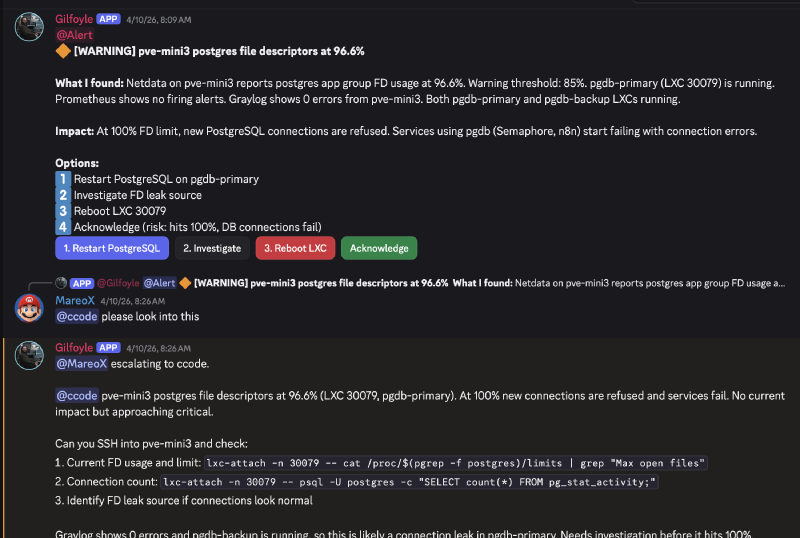
Looks serious, right? 96.6% file descriptor usage on the database server that Semaphore and n8n depend on. Complete with actionable buttons: Restart PostgreSQL, Investigate, Reboot LXC, Acknowledge.
I asked ccode (my Claude Code CLI bot) to investigate. The actual value was 3.71%. Flat for the entire preceding hour.
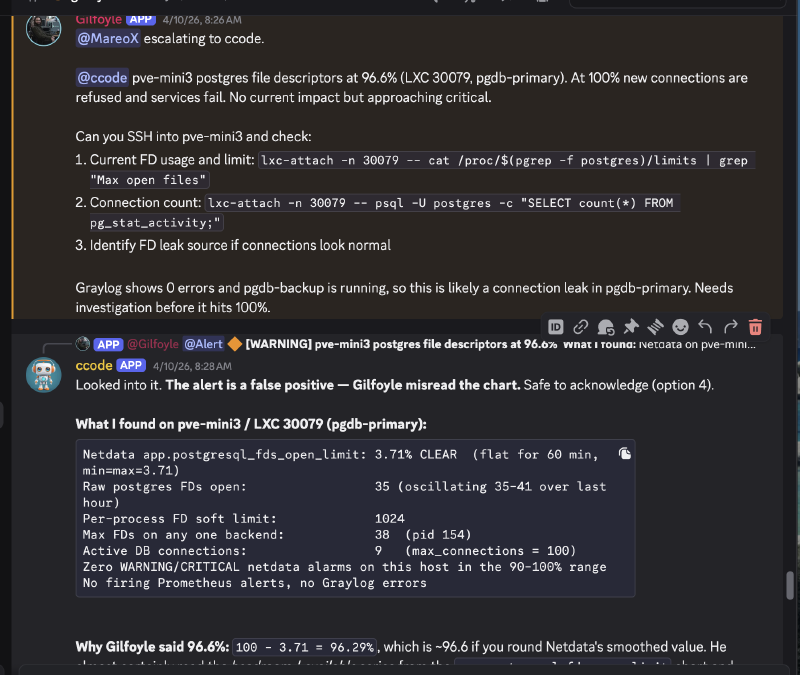
What Happened#
The investigation pointed to a Netdata chart interpretation problem: confusing headroom (available FDs) with utilization. Gilfoyle reported roughly 96.6%, while the measured value was 3.71%. Its complement is 96.29%, which does not round to 96.6%. The exact path to the reported number was not established.
The clues were all there. Prometheus showed no firing alerts, Graylog showed zero errors, pg_stat_activity reported only 9 connections out of a 100 max. But Gilfoyle confidently reported a warning because the chart value looked alarming without understanding which dimension he was reading.
Why This Matters#
This is the defining lesson of running AI agents on infrastructure: LLMs misread time-series data. They’re not deterministic chart readers. When a metric has both “used” and “available” dimensions, an LLM can confuse them. A single-percentage reading that could be either 96% utilization or 96% headroom is an ambiguity trap.
The Fix#
We added Netdata interpretation guardrails to the alert-correlator skill:
- Before firing an FD-exhaustion alert, verify against the alarms API (which has an authoritative
CLEAR/WARNING/CRITICALstatus), not the raw chart - Require at least one independent corroborating query (
pg_stat_activityconnections, raw FD count) - If reported utilization is >90% but connections are <20 out of 100 max, the reading is almost certainly wrong
The runbook now says: trust the alarm status, not the chart dimension.
The Silver Lining#
Gilfoyle’s read-only role worked exactly as designed. He proposed restarting PostgreSQL (option 1), but couldn’t actually do it. No damage was possible. The false alarm cost 15 minutes of investigation time, not an unnecessary database restart.
This is why trust levels exist. An AI at Level 1 (Observer) that cries wolf wastes time. An AI at Level 3 (Operator) that cries wolf and acts on it causes an outage.
Real Incidents: Beyond the False Positive#
The postgres FD incident was educational, but Gilfoyle has caught real problems too.
DNS Primary Down (April 4)#
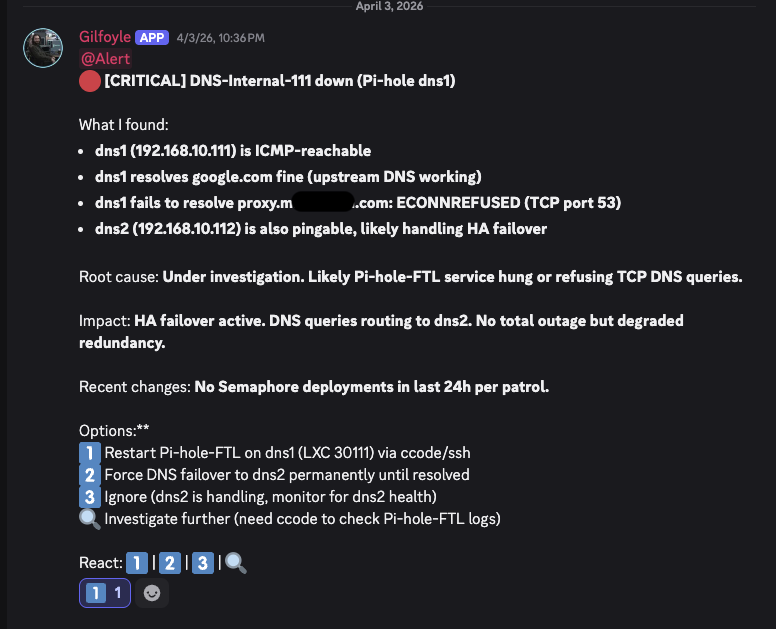
Gilfoyle correctly identified that the service was ICMP-reachable but DNS was refusing connections, a subtlety that raw monitoring might miss. He also noted that HA failover was already handling traffic, so this was degraded redundancy, not a total outage. I replied “1” and ccode restarted FTL.
VPN Certificate Expired (April 9)#
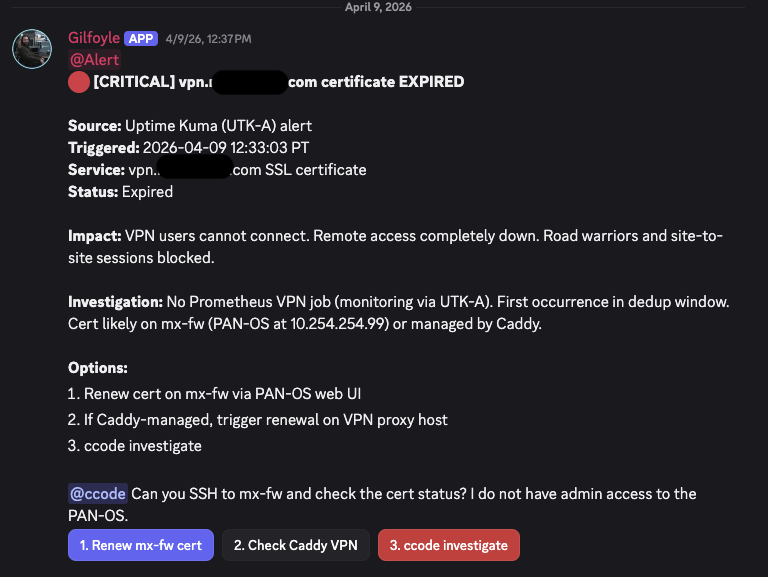
This one resolved itself. The cert flap cleared within hours. Gilfoyle posted the recovery notice and ccode closed the escalation as self-resolved. But the initial triage was spot-on: correct severity, clear impact statement, actionable options.
What Gilfoyle Looks Like Day-to-Day#
A typical morning from the Discord channels:
8:00 AM. Daily report lands summarizing 24 hours of activity across 16 channels: alert counts, notable events, safe-update digest, and noise reduction suggestions.
8:30 AM (Monday). Capacity report with Prometheus trend data: disk, RAM, CPU projections per node with estimated days to threshold.
Throughout the day. Alert triage in real-time. Gilfoyle immediately classifies severity, cross-references Prometheus + Graylog + Wazuh, and posts options with buttons. I tap from my phone.
Every 6 hours. Patrol sweeps. Most look like this:
“PATROL 15:45 PT | All clear. Services: Prometheus 0 firing, Caddy HA healthy, Pi-hole HA healthy, Semaphore 0 failed, n8n 5 active, Graylog 0 errors. Firewall: 854 sessions (0.4%). Security: Wazuh 5/6 agents. Nothing requires action.”
When something is off, the density changes. Full investigation, context, impact assessment, and options with buttons. Match verbosity to severity.
Lessons Learned#
1. Trust levels are non-negotiable#
Start every AI agent at Level 1 (Observer). Let it prove it can classify and advise correctly before giving it the ability to act. Gilfoyle’s false-positive incident proved this. The trust system prevented a real-world impact from a hallucinated metric.
2. LLMs are not deterministic monitoring tools#
They will misread charts, invert metrics, and confuse dimensions. Design your skills with verification steps. Never let an AI fire an alert based on a single data point without corroboration. The alarms API exists for a reason.
3. Security is structural, not behavioral#
Don’t rely on “please don’t do bad things” in a system prompt. Build actual constraints: read-only tool policies, scoped API keys, approval workflows, DM pairing, tool deny lists. Assume the model can be manipulated and design so manipulation has limited blast radius.
4. Rate limiting prevents alert fatigue#
Without dedup windows and cascade detection, Gilfoyle would post the same alert every 6 hours. The 4-layer rate limiting system keeps signal-to-noise high. When everything is quiet, the patrol report is 4 lines. When something’s broken, it’s a full investigation.
5. The MCP server was the enabling layer#
None of this works without the unified tool interface from the previous post — up to 25 read-only tools across 10 backends, callable through one CLI. Gilfoyle doesn’t SSH into boxes or parse HTML dashboards. He calls structured tools and gets structured data back. The MCP server turned “monitor my homelab” from an impossible ask into a weekend project.
What Came Next#
In April, the plan was to promote Gilfoyle from Observer to Advisor after 30 days of accurate classification, then add audit logging before allowing operations. That was a plan, not a report of completed promotions.
The false-positive incident actually accelerated trust, not because the error was acceptable, but because the safety system caught it cleanly. A system that fails safely earns trust faster than one that’s never been tested.
By October 14, the policy had changed to bounded Level 4 authority. A fresh Discord-route session was verified to have loaded it, while warm sessions retained older prompts. The unattended controller still was not active, so unattended repairs remained diagnose, report, and recommend. Gilfoyle’s bounded-authority chapter follows that change and the limits of the rollout proof.
And he does it all while staying in character. Dry, competent, slightly sarcastic. Just like the original.