  1. Posts/

Migrating from Speedtest Tracker to MySpeed

Author
Mario
Security engineer by day, homelab tinkerer by night. Building self-hosted infrastructure and documenting the journey.

Overview
#

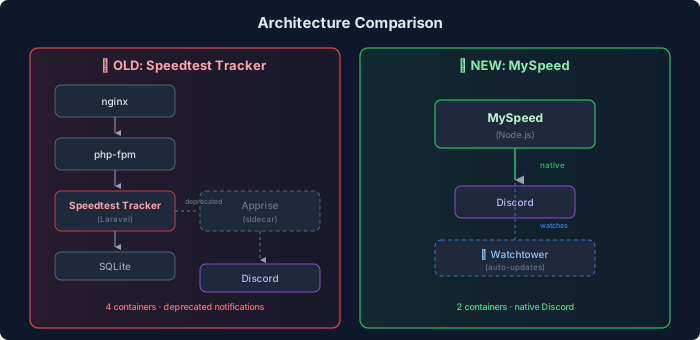
I migrated my internet speed monitoring from Speedtest Tracker to MySpeed after learning that Speedtest Tracker was deprecating native Discord notifications. Rather than adding an Apprise sidecar container for notifications, I opted for MySpeed which has built-in Discord support.

Why Migrate?
#

FactorSpeedtest TrackerMySpeed
StackLaravel/PHPNode.js
DiscordDeprecated (needs Apprise)Native support
Complexitynginx + php-fpm + SQLiteSingle Docker container
UpdatesManualWUD opt-in monitoring

Architecture Comparison
#

Architecture comparison between Speedtest Tracker and MySpeed

Prerequisites
#

  • Existing LXC or VM with network connectivity
  • Docker and docker-compose installed
  • Reverse proxy configuration (Caddy/nginx)
  • DNS records configured

Migration Steps
#

Step 1: Backup Existing Data
#

Before removing Speedtest Tracker, I preserved the historical data:

1
2
3
4
5
6
7
8
9
# SSH to the server
ssh -i ~/.ssh/<YOUR_KEY> <USER>@<SPEED_MONITOR_IP>

# Create backup directory
sudo mkdir -p /opt/speedtest-tracker-backup

# Backup the SQLite database
sudo cp /opt/speedtest-tracker/database/database.sqlite \
  /opt/speedtest-tracker-backup/speedtest-final-backup.sqlite

Step 2: Stop Old Services
#

1
2
3
4
5
6
# Stop and disable the old PHP services
sudo systemctl stop nginx php*-fpm
sudo systemctl disable nginx php*-fpm

# Remove old installation (optional, after verifying backup)
sudo rm -rf /opt/speedtest-tracker

Step 3: Install Docker (if not present)
#

1
2
3
4
sudo apt-get update
sudo apt-get install -y docker.io docker-compose
sudo systemctl enable docker
sudo systemctl start docker

Step 4: Deploy MySpeed
#

Create the deployment directory and compose file:

 1
 2
 3
 4
 5
 6
 7
 8
 9
10
11
12
13
14
15
16
17
18
19
20
21
22
23
24
25
26
27
28
29
30
31
sudo mkdir -p /opt/myspeed
sudo tee /opt/myspeed/docker-compose.yml << 'EOF'
version: '3.8'

services:
  myspeed:
    image: germannewsmaker/myspeed:latest
    container_name: myspeed
    restart: unless-stopped
    ports:
      - '5216:5216'
    volumes:
      - myspeed-data:/myspeed/data
    environment:
      - TZ=<YOUR_TIMEZONE>

  wud:
    image: getwud/wud:latest
    container_name: wud
    restart: unless-stopped
    volumes:
      - /var/run/docker.sock:/var/run/docker.sock
    environment:
      - WUD_WATCHER_LOCAL_WATCHBYDEFAULT=false
      - TZ=<YOUR_TIMEZONE>
    labels:
      - wud.watch=true

volumes:
  myspeed-data:
EOF

Start the containers:

1
2
cd /opt/myspeed
sudo docker compose up -d

Step 5: Update Reverse Proxy
#

For Caddy, update your site configuration:

 1
 2
 3
 4
 5
 6
 7
 8
 9
10
myspeed.<YOUR_DOMAIN> {
    reverse_proxy http://<SPEED_MONITOR_IP>:5216 {
        health_uri /
        health_interval 30s
        health_timeout 5s
    }
    header {
        Strict-Transport-Security "max-age=31536000; includeSubDomains; preload"
    }
}

Validate and reload:

1
2
docker exec caddy caddy validate --config /etc/caddy/Caddyfile
docker compose restart caddy

Step 6: Update DNS
#

Add an A record pointing your hostname to the server IP:

1
<YOUR_HOSTNAME>.local  →  <SPEED_MONITOR_IP>

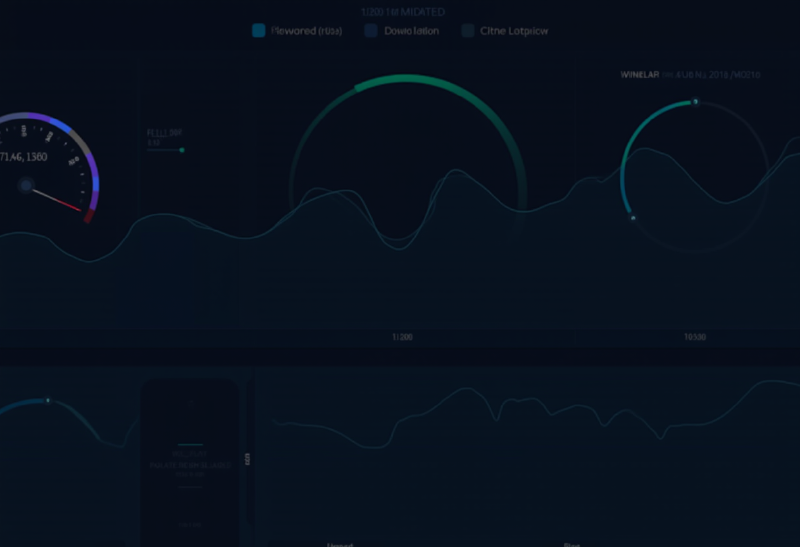
MySpeed dashboard showing internet speed metrics over time

Verification
#

1
2
3
4
5
6
7
8
9
# Check container is running
sudo docker ps | grep myspeed

# Test HTTP response
curl -s -o /dev/null -w '%{http_code}' http://localhost:5216
# Expected: 200

# Test DNS resolution
dig @<DNS_SERVER_IP> myspeed.<YOUR_DOMAIN> +short

Configuring Discord Notifications
#

This was the whole point of the migration! MySpeed makes it simple:

  1. Access the MySpeed web UI
  2. Navigate to SettingsNotifications
  3. Add your Discord webhook URL
  4. Configure triggers (test failures, speed drops, etc.)
  5. Send a test notification to verify

What I Learned
#

  1. Built-in integrations matter: Choosing apps with native features saves complexity
  2. Docker simplifies migrations: Swapping container-based services is trivial
  3. Always backup first: Even if data isn’t directly importable, it’s good to have
  4. HA deployments need attention: Remember to update ALL reverse proxy nodes

Troubleshooting
#

Container won’t start
#

Check logs: sudo docker logs myspeed --tail 50

Can’t access web UI
#

Verify the port isn’t blocked and container is healthy:

1
2
sudo docker ps
curl http://localhost:5216

Discord notifications not working
#

  • Verify webhook URL is correct
  • Check MySpeed logs for API errors
  • Test webhook directly with curl

Resources
#