
The Problem#
My PAN-OS firewall (GlobalProtect VPN portal at vpn.mareoxlan.com) needs a valid TLS certificate. I had a dedicated LXC (30122) running acme.sh with a Cloudflare DNS-01 challenge to issue a wildcard cert, then a PAN-OS deploy hook to push it to the firewall via the XML API. It worked, but it was a single-purpose VM doing the same job my Caddy reverse proxy already does – Caddy auto-renews *.mareoxlan.com via the same Cloudflare DNS-01 mechanism.
That’s two separate ACME clients, two separate renewal schedules, and a whole LXC just to shuffle a certificate. Time to consolidate.
The Approach#
Reuse Caddy’s wildcard cert instead of maintaining a separate ACME flow:
- Caddy already auto-renews
*.mareoxlan.comand stores the cert/key on an NFS share (HA NFS pair at nfs1/nfs2) - Proxmox host pve-mini6 already mounts that NFS share at
/mnt/nfs-caddy-data/ - A Semaphore Ansible playbook runs weekly, compares the Caddy cert expiry against what’s on the firewall, and only deploys when they differ
This eliminates LXC 30122 entirely – no more dedicated cert management VM.
Architecture#
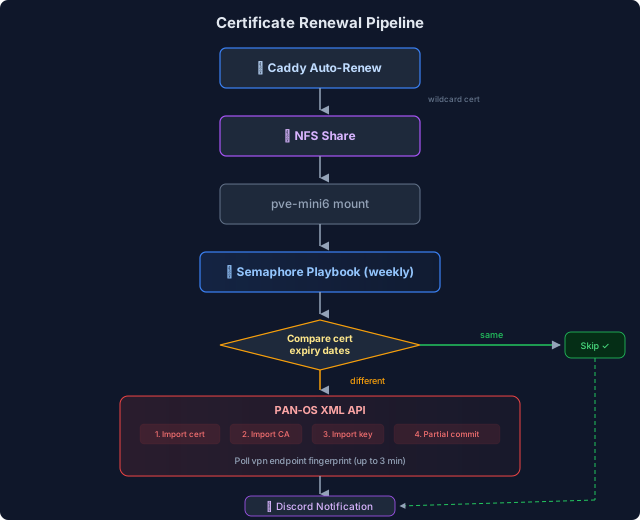
Key Discoveries#
PAN-OS XML API Quirks#
The PAN-OS XML API has some undocumented behaviors that cost me debugging time:
Private key import requires passphrase=none even for unencrypted PEM keys. Without this parameter, the API silently accepts the import but the key isn’t usable. The error only surfaces when you try to use the certificate.
Certificate chain import: When you upload a PEM file containing both server cert and intermediate, PAN-OS imports only the leaf certificate. You need to separately import the intermediate CA for the full chain to be served by GlobalProtect.
No show certificate in the XML API: I expected to verify the import by querying the cert details via API, but <show><certificate> returns “unexpected command”. Instead, I poll the live endpoint (vpn.mareoxlan.com:443) with openssl s_client and compare SHA-256 fingerprints.
Partial commits are scoped by admin user: Using <commit><partial><admin><member>certbot</member></admin></partial></commit> ensures the cert deploy doesn’t interfere with other admin sessions. The certbot user only has certificate management permissions.
Semaphore Environment Variables Are Ansible Extra Vars#
This tripped me up: Semaphore’s “Environment” JSON field becomes --extra-vars when passed to Ansible, NOT OS environment variables. So lookup('env', 'PANOS_PASS') returns empty. The fix is a dual-compatibility pattern:
| |
This works whether run from Semaphore (extra vars) or from CLI (env vars).
Let’s Encrypt Chain Structure#
Caddy’s PEM file contains two certificates: the server cert (*.mareoxlan.com) and the intermediate (Let's Encrypt E7). I extract the intermediate with awk:
| |
Then import it to PAN-OS as a separate certificate named LetsEncrypt-E7.
Active Verification Instead of Static Waits#
The original playbook had a pause: seconds: 30 after committing the cert to the firewall, hoping GlobalProtect would reload in time. I replaced this with active fingerprint polling:
| |
This polls every 15 seconds for up to 3 minutes. It either confirms the new cert is live or fails explicitly – no more guessing if 30 seconds was enough.
Results#
Before: LXC 30122 (acme.sh + cron + PAN-OS deploy hook) – dedicated VM, separate ACME renewal, no monitoring, no alerting on failure.
After: Semaphore Template 22 in Project “MareoXLAN” – weekly cron (Sunday 5 AM), reuses existing Caddy cert from NFS, Discord notifications on success/failure, full post-deploy verification (fingerprint + expiry + chain depth).
Resources saved: One LXC (2 vCPU, 512 MB RAM) decommissioned. Zero additional infrastructure added.
What’s Next#
- Wait for 1-2 successful Sunday cron cycles to confirm reliability
- Decommission LXC 30122 (panw-certbot) following the standard lifecycle offboarding process
- The intermediate CA name (
LetsEncrypt-E7) will need updating when Let’s Encrypt rotates intermediates – but the playbook will still import whatever intermediate is in the chain, just under the old name. A future improvement could extract the CN dynamically.