The Problem: Six Interfaces for One Question#
“Is anything broken in my homelab?”
Answering that question used to mean: SSH into Proxmox to check guest status. Curl the Pi-hole API for DNS health. Open Grafana to scan Prometheus alerts. Check Graylog for error spikes. Look at Semaphore for failed automation runs. Glance at Caddy logs for 502s.
Six interfaces. Six authentication contexts. Six mental models. And that’s just the read side. Want to restart a misbehaving container? That’s another SSH session, another set of commands, another chance to fat-finger a VMID.
I had two MCP servers already: one for Semaphore (CI/CD automation) and one for PAN-OS (firewall management). Each worked fine in isolation. But every new MCP server meant another process, another .mcp.json entry, and no way to do cross-service operations like “check the health of everything.”
The Decision#
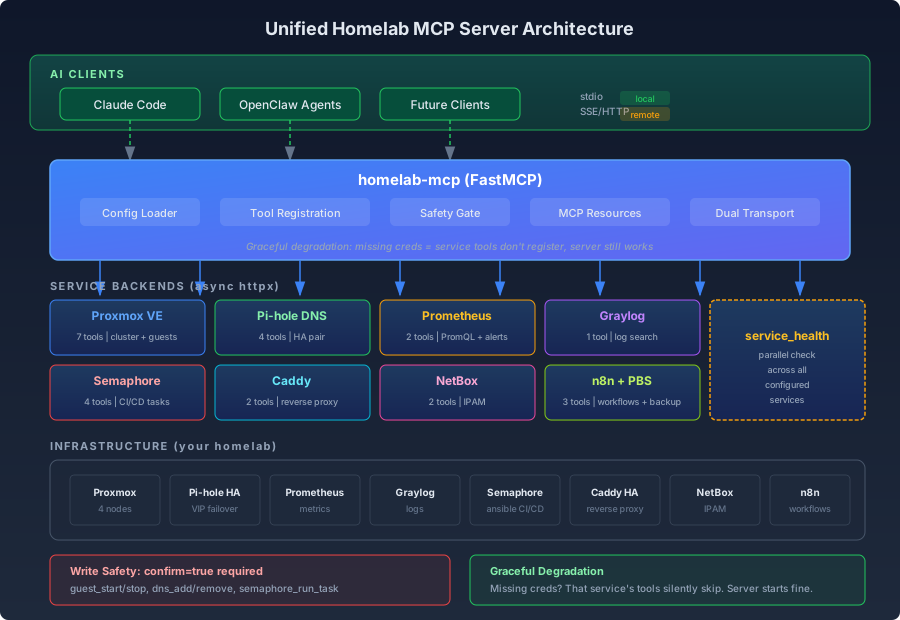
Build a single FastMCP server that wraps all 9 homelab services behind one unified interface. One process. One config. 26 tools covering daily infrastructure operations.
The Semaphore MCP gets absorbed. The PAN-OS MCP stays separate (it’s an upstream fork with a different domain). Everything else is new.
Why MCP?#
MCP (Model Context Protocol) is the native protocol for AI clients like Claude Code. Building a REST API would require an adapter layer. MCP tools map directly to what an AI assistant can call, with structured input schemas, descriptions, and return types. The AI doesn’t need to parse HTML or guess at curl flags. It calls list_guests(status="running") and gets structured data back.
Architecture#
The server follows a modular pattern: one Python module per service, each with its own async HTTP client, all registered conditionally at startup.
Graceful Degradation#
This was the most important design choice. The server loads each service config independently with try/except. Missing Graylog credentials? Graylog tools don’t register, but everything else works. The server starts successfully with just Proxmox configured.
| |
This means you can start using the MCP immediately with just one service configured, then add credentials for others as needed. No “all or nothing” startup failures.
The Safety Gate#
Every write operation (starting/stopping containers, adding DNS records, running Semaphore tasks) goes through a confirmation gate. Without confirm=true, the tool returns a preview of what it would do.
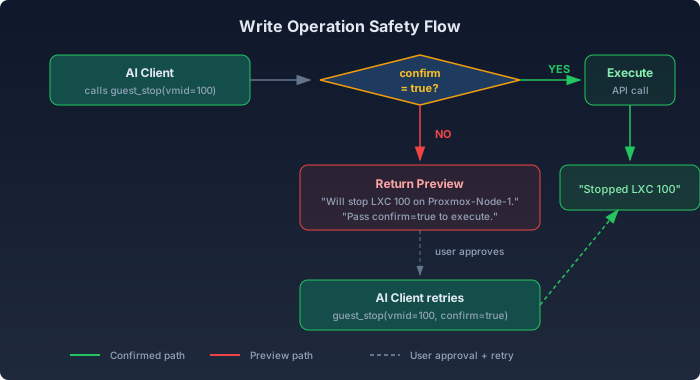
This maps perfectly to Claude Code’s permission model. The AI calls the tool, gets the preview, shows it to the user, and only executes when approved. No accidental guest_stop on a production database.
| |
Simple, but it means every destructive operation has a human approval step baked into the protocol.
Service Backends#
Proxmox (the core)#
The Proxmox service was ported from an existing infrastructure drift scanner. The key reuse was the IP extraction logic, which handles Proxmox’s inconsistent IP reporting across LXC configs, cloud-init, and QEMU agent data:
| |
The original used synchronous requests. The port to async httpx was mechanical but important: MCP servers handle concurrent tool calls, so blocking I/O would serialize everything.
Tools: infra_overview, list_guests, get_guest, node_status, guest_start, guest_stop, guest_restart
Pi-hole HA#
The homelab runs Pi-hole in a high-availability pair with keepalived failover. The MCP service manages both instances, authenticating to each independently using Pi-hole v6’s session-based auth (SID + CSRF tokens):
| |
Tools: dns_list_records, dns_lookup, dns_add_record, dns_remove_record
Prometheus#
No auth needed (internal network), so this service always loads when the server starts. Exposes raw PromQL queries and a structured alerts endpoint:
Tools: prom_query, prom_alerts, prom_targets
Graylog#
Basic auth over the Graylog REST API. The search tool accepts a query string and timerange, returning structured log entries:
Tools: search_logs, graylog_streams, graylog_overview
Semaphore (absorbed)#
The standalone Semaphore MCP server (376 lines, raw Server class) was ported into the unified server. Same httpx async pattern, but with cleaner FastMCP decorators and the shared safety gate for run_task:
Tools: semaphore_list_projects, semaphore_list_templates, semaphore_run_task, semaphore_task_status
Caddy, NetBox, n8n, PBS#
Read-only tools for the remaining services. Caddy manages both HA instances (like Pi-hole). NetBox provides IPAM lookups. n8n exposes workflow and execution data. PBS (Proxmox Backup Server) shows backup status and datastore health.
The Tool Inventory#
| Category | Tools | Safety |
|---|---|---|
| Proxmox | 7 (overview, guests, nodes, power ops) | 3 write |
| Pi-hole DNS | 4 (list, lookup, add, remove) | 2 write |
| Prometheus | 3 (query, alerts, targets) | read-only |
| Graylog | 3 (search, streams, overview) | read-only |
| Semaphore | 4 (projects, templates, run, status) | 1 write |
| Caddy | 2 (sites, config) | read-only |
| NetBox | 3 (search, IPs, devices) | read-only |
| n8n | 2 (workflows, executions) | read-only |
| PBS | 3 (datastores, backups, tasks) | read-only |
| Cross-service | 1 (health check) | read-only |
| Total | 32 | 6 write |
The service_health tool runs parallel health checks across all configured services using asyncio.gather(), returning a unified status in one call.
Configuration#
The entire server is configured through environment variables, one prefix per service:
| |
Claude Code connects via a single .mcp.json entry:
| |
What It Looks Like in Practice#
With the MCP running, a conversation with Claude Code goes from “let me SSH into three boxes” to:
Me: “Is anything broken?”
Claude: calls
service_health“All 7 configured services healthy. Proxmox cluster: 4 nodes, 47 guests (38 running). No Prometheus alerts firing. Graylog ingestion rate normal.”
Me: “Restart the n8n container, it’s acting up”
Claude: calls
guest_restart(vmid=30062)“Will restart LXC 30062 (n8n) on pve-mini5. Pass confirm=true to execute.”Me: “Do it”
Claude: calls
guest_restart(vmid=30062, confirm=true)“Restarted LXC 30062.”
Me: “Add a DNS record for the new service”
Claude: calls
dns_add_record(domain="newservice.homelab.local", ip="<IP>", confirm=true)“Added A record to both Pi-hole servers.”
No SSH. No curl. No context switching. The AI handles the API calls, the user handles the decisions.
Code Reuse#
One of the satisfying parts of this project was how much existing code got reused:
| Source | Destination | What was ported |
|---|---|---|
| Infrastructure drift scanner | Proxmox service | Guest dataclass, IP extraction, node iteration |
| PAN-OS MCP config | Config module | pydantic-settings pattern with env_prefix |
| PAN-OS MCP entry points | Transport modules | Dual stdio/SSE pattern |
| Standalone Semaphore MCP | Semaphore service | All 8 tools, API paths |
| Pi-hole DNS deploy script | Pi-hole service | v6 session auth, record CRUD |
The main transformation across all ports was requests (sync) to httpx (async). The business logic stayed the same.
What’s Next#
Phase 1 (done): Daily operations. 26 tools covering the services I touch every day.
Phase 2 (planned): MCP Resources. Serve infrastructure documentation (IP inventory, known pitfalls, service CLAUDE.md files) directly through the MCP protocol so AI clients have context without reading files.
Phase 3 (future): SSE transport for remote clients. The server already has the entry point; it just needs to be deployed behind Caddy on a dedicated LXC. This opens the door for autonomous agents running on separate hosts to query infrastructure state.
Lessons Learned#
Graceful degradation beats fail-fast for infrastructure tools. You don’t want your entire MCP server down because one service’s API key expired. Independent loading per service means partial outages stay partial.
The confirmation gate is worth the extra round-trip. It feels slightly slower, but it means you can give an AI full write access to your infrastructure and sleep at night. The preview text also serves as documentation: the AI shows the user exactly what will happen before it happens.
Absorb, don’t proliferate. Having 9 separate MCP servers would be unmaintainable. One server with conditional registration keeps the process count at 1 and makes cross-service tools (like health checks) trivial.
async from the start. Porting sync code to async later is painful. Starting with
httpxandasync/awaitmeant theservice_healthtool could check all services in parallel from day one.