  1. Posts/

How I Got Every Device Named in My Firewall Logs (Without Active Directory)

Author
Mario
Security engineer by day, homelab tinkerer by night. Building self-hosted infrastructure and documenting the journey.
Table of Contents

TL;DR
#

A Python script that identifies every device on your network in PAN-OS traffic logs, without Active Directory. Combines Pi-hole DNS, UniFi Controller, and DHCP leases into one priority merge. 124 devices named on my PA-440.

Before:

1
2
3
192.168.10.128  →  8.8.8.8       user: unknown
192.168.30.240  →  1.1.1.1       user: unknown
172.30.50.77    →  52.26.132.60  user: unknown

After:

1
2
3
192.168.10.128  →  8.8.8.8       user: iphone
192.168.30.240  →  1.1.1.1       user: graylog
172.30.50.77    →  52.26.132.60  user: ring - front door

Here’s what the traffic logs look like on my PA-440 with User-ID populated:
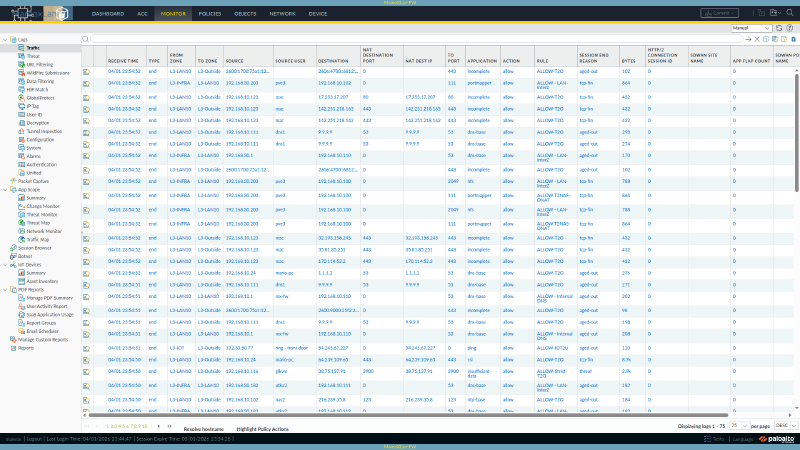
PAN-OS traffic logs showing device names in the Source User column
Traffic logs on mx-fw showing device hostnames instead of ‘unknown’


Quick Start (5 minutes)
#

What you need:

  • A PAN-OS firewall acting as DHCP server (any model, any version with XML API)
  • An admin API key for the firewall
  • Python 3.6+ on any machine that can reach the firewall over HTTPS

Step 1: Generate a PAN-OS API key (run this once):

1
2
3
curl -sk \
  "https://<FIREWALL_IP>/api/?type=keygen\
&user=<ADMIN_USER>&password=<PASSWORD>"

Copy the key from the <key> element in the response. See the PAN-OS API key generation docs for details.

Step 2: Create the script and config file:

1
2
3
4
5
# Create a .env file with your credentials
cat > .env << 'EOF'
firewall-ip=<YOUR_FIREWALL_IP>
admin-api-key=<YOUR_API_KEY_FROM_STEP_1>
EOF

Then create sync_userid_dhcp.py with the full source at the bottom of this post.

Step 3: Run it:

1
2
3
4
5
# Preview what it would do (no changes made)
python3 sync_userid_dhcp.py --dry-run --verbose

# Push mappings to the firewall
python3 sync_userid_dhcp.py --verbose

That’s it for the basic DHCP setup. Your traffic logs will now show hostnames for every device that sends a DHCP hostname (option 12). Read on to add UniFi and static DNS sources for full coverage.


Prerequisites (Things You Must Configure First)
#

The script pushes mappings via API, but PAN-OS needs to be told to use those mappings in logs and policies. If you skip this, the mappings exist but don’t appear anywhere.

1. Enable User-ID on Your Zones
#

In the PAN-OS web UI: Device > User Identification > User Mapping

Then for each internal zone (Network > Zones > click zone name):

  • Check Enable User Identification

Or via CLI:

1
set zone <ZONE_NAME> enable-user-identification yes

Enable it on every zone where you want to see device names in traffic logs. Don’t enable it on your WAN/untrust zone.
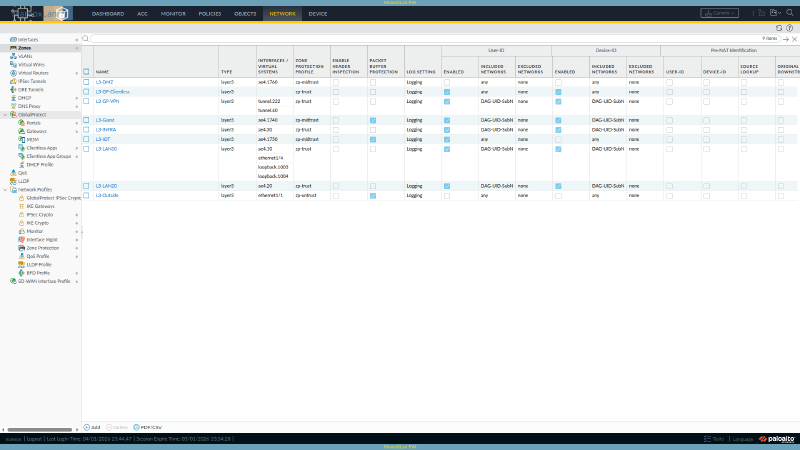
PAN-OS zone configuration showing User Identification enabled on internal zones
Network > Zones on mx-fw, User Identification column shows which zones have User-ID enabled

See the official User-ID zone configuration guide for full details on enabling User-ID per zone and configuring the User Mapping agent.

2. Verify the API Key Works
#

Test your API key can push User-ID entries:

1
2
3
4
5
6
7
8
curl -sk "https://<FIREWALL_IP>/api/?type=user-id\
&key=<API_KEY>\
&cmd=<uid-message>\
<version>2.0</version>\
<type>update</type>\
<payload><login>\
<entry name=\"test-device\" ip=\"192.168.1.254\" timeout=\"5\"/>\
</login></payload></uid-message>"

You should see <response status="success">. The test mapping expires in 5 minutes.

3. No Firewall Configuration Changes Needed
#

Unlike the syslog loopback approach, this script requires zero configuration on the firewall itself. No syslog profiles, no parse profiles, no server monitors. Just API calls from an external host.


How the Script Works
#

The Core Idea
#

No single source knows every device:

  • DHCP only sees dynamic clients (and some don’t send hostnames)
  • DNS records only cover devices you’ve manually documented
  • UniFi only sees devices on its switches/APs (not VMs behind virtual bridges)

The script queries all three, merges them by IP with a priority order, and pushes the combined list to PAN-OS via the User-ID XML API.

The Priority Merge (This Is the Key Concept)
#

flowchart TD A["Pi-hole A Records\n(static infrastructure)\n69 devices"] --> M B["UniFi Controller\n(device fingerprint)\n46 devices"] --> M C["PAN-OS DHCP\n(dynamic leases)\n54 leases"] --> M M{"Priority Merge\n(first source wins per IP)"} M --> D["User-ID XML API\nBatched push\n(50 entries/request)"] D --> E["124 Named Mappings\non PA-440 Firewall"] style A fill:#2563eb,stroke:#1d4ed8,color:#fff style B fill:#059669,stroke:#047857,color:#fff style C fill:#d97706,stroke:#b45309,color:#fff style M fill:#7c3aed,stroke:#6d28d9,color:#fff style D fill:#4b5563,stroke:#374151,color:#fff style E fill:#dc2626,stroke:#b91c1c,color:#fff
⛶ Click to expand

The priority order determines which source wins when multiple sources know the same IP:

PrioritySourceWhat It CoversExample Names
1Pi-hole A recordsStatic infrastructure (Proxmox, Caddy, NFS)graylog, pve5, caddy
2UniFi client namesUser-assigned labels in the UniFi UIRing - Front Door, NAS-920
3DHCP hostnamesWhat the device reports via DHCP option 12iphone, mario-pc
4UniFi OUI vendorManufacturer from MAC address prefixAmazon-08568d, Ring-7781ac

The merge is a Python dictionary where the first source to claim an IP wins:

 1
 2
 3
 4
 5
 6
 7
 8
 9
10
11
12
13
14
15
16
17
18
19
20
21
all_mappings = {}  # ip -> {username, source}

# Priority 1: Static DNS (manually curated, cleanest names)
for record in static_dns_records:
    all_mappings[record["ip"]] = record

# Priority 2: UniFi client names (user-assigned labels)
for client in unifi_clients:
    if client["ip"] not in all_mappings:
        all_mappings[client["ip"]] = client

# Priority 3: DHCP hostnames (what the device reports)
for lease in dhcp_leases:
    if lease["ip"] not in all_mappings:
        all_mappings[lease["ip"]] = lease

# Priority 4: Replace ugly "mac-XXXX" with manufacturer names
for oui_entry in unifi_oui_fallbacks:
    ip = oui_entry["ip"]
    if ip in all_mappings and all_mappings[ip]["username"].startswith("mac-"):
        all_mappings[ip] = oui_entry

Why this order? A real example: my Proxmox host at 192.168.30.205 appears in:

  • Pi-hole A records as pve5 (clean, short, I chose this name)
  • UniFi as PVE5 (from the controller’s device fingerprint)
  • DHCP: not at all (static IP, no lease)

The A record wins because it’s manually curated and the shortest/cleanest.

The API Push
#

PAN-OS accepts bulk User-ID entries via a single API call using the User-ID XML API:

 1
 2
 3
 4
 5
 6
 7
 8
 9
10
11
12
13
14
15
16
17
<uid-message>
  <version>2.0</version>
  <type>update</type>
  <payload>
    <login>
      <entry name="iphone"
             ip="192.168.10.128"
             timeout="180"/>
      <entry name="graylog"
             ip="192.168.30.240"
             timeout="180"/>
      <entry name="ring - front door"
             ip="172.30.50.77"
             timeout="180"/>
    </login>
  </payload>
</uid-message>

Key fields:

  • name: whatever you want to appear in traffic logs (hostname, device name, etc.)
  • timeout: minutes until the mapping expires (180 = 3 hours)
  • No commit needed. Mappings are dynamic and ephemeral.
Gotcha: HTTP 414. With 100+ entries, the URL-encoded XML exceeds the URI length limit. The script batches into groups of 50 to avoid this.

Adding UniFi Controller (Optional, Recommended)#

If you run UniFi switches or APs, you already have a goldmine of device identity data. The controller fingerprints every connected client and knows:

FieldWhat It IsExample
nameLabel you set in the UniFi UIRing - Front Door
hostnameDHCP hostname the device reportedLG_Smart_Fridge2_open
ouiManufacturer from MAC address lookupAmazon Technologies Inc.
macDevice MAC address54:e0:19:83:d4:82

What UniFi reveals that DHCP alone misses:

DeviceDHCP HostnameUniFi Knows
Fire TV Stick[Unavailable]name: HO-FTV4kUltra
Ring Doorbell(empty)name: Ring - Front Door, OUI: Ring LLC
TP-Link Smart Plug(empty)hostname: KP115, OUI: TP-Link
Smart Fridge(empty)hostname: LG_Smart_Fridge2_open
Amazon Fire Stick(empty)OUI: Amazon Technologies Inc.

UniFi Setup
#

Add UniFi credentials to your .env file:

1
2
3
4
5
6
# Append to your existing .env
cat >> .env << 'EOF'
UNIFI_CONTROLLER_URL=https://<UNIFI_IP>:8443
UNIFI_USERNAME=<YOUR_UNIFI_ADMIN>
UNIFI_PASSWORD=<YOUR_UNIFI_PASSWORD>
EOF

The script auto-detects the UniFi .env if it’s at ../../unifi/.env relative to the script, or reads from environment variables UNIFI_URL, UNIFI_USER, UNIFI_PASS.

UniFi API notes:

  • Uses session-based auth (login with username/password, get cookie, query, logout)
  • The endpoint is GET /api/s/default/stat/sta (returns all connected clients)
  • Works with UniFi Network Application 7.x+ and UniFi OS consoles
  • Port 8443 is the default for self-hosted; CloudKey/UDM may differ
  • The script handles SSL certificate warnings automatically (self-signed certs are common)
See the UniFi API documentation for the full list of available endpoints and client data fields.

Tip: Name Your Devices in UniFi
#

Open the UniFi web UI, go to Clients, click any device, and set a friendly name. These names become Priority 2 in the merge and show up in your firewall logs. I named my Ring doorbells, NAS boxes, and KVMs this way.


Adding Static DNS Records (Optional, For Infrastructure)
#

Devices with static IPs (servers, Proxmox hosts, switches, access points) never appear in DHCP. If you maintain Pi-hole A records or any hostname-to-IP file, the script can read it.

Pi-hole A Records Format
#

The script parses this YAML format (used by Pi-hole’s DNS management):

 1
 2
 3
 4
 5
 6
 7
 8
 9
10
11
12
13
14
groups:
  - name: "Reverse Proxy"
    records:
      - ip: "192.168.30.160"
        hostname: "caddy.mydomain.local"
      - ip: "192.168.30.162"
        hostname: "caddy2.mydomain.local"

  - name: "Monitoring"
    records:
      - ip: "192.168.30.240"
        hostname: "graylog.mydomain.local"
      - ip: "192.168.30.194"
        hostname: "prometheus.mydomain.local"

Don’t use Pi-hole? You can substitute any hostname-to-IP source. The script just needs a file it can parse. Adapt the get_static_mappings() function to read your format (CSV, JSON, hosts file, whatever you use).

The script auto-discovers the A records file at ../../pihole/dns-records/a-records.yaml relative to its location, or you can set the ARECORDS_YAML_PATH environment variable.

Domain suffixes are stripped automatically. graylog.mydomain.local becomes graylog in traffic logs. When an IP has multiple DNS names, the shortest one is kept.


Gotchas I Hit (Save Yourself the Debugging)
#

1. The Syslog Loopback Doesn’t Work
#

The commonly-referenced approach configures the firewall to forward DHCP lease logs back to its own syslog listener. I implemented all four components (syslog profile, log match filter, parse profile, server monitor).

Result: 0 messages. PAN-OS cannot deliver UDP syslog to its own interface. I tested the OOB management IP, the in-band data-plane IP, localhost, and even removed the syslog service route to force management-plane routing. None worked.

The syslog loopback approach requires an external syslog relay (another server that receives and re-sends the logs). For a single-firewall homelab, the XML API approach described here is simpler and more reliable.

2. DHCP Reservations Were Being Skipped
#

PAN-OS marks DHCP reservations as state=reserved. My first version skipped all reserved entries because most are MAC-only reservations without hostnames. But my main workstation had a DHCP reservation with a hostname, and it was invisible.

Fix: Only skip reserved entries that have no hostname. If the reservation includes a hostname, use it.

3. HTTP 414 URI Too Long
#

With 124 entries in a single URL-encoded request, the PAN-OS web server rejects it. The script batches into groups of 50.

4. UniFi API Requires Session Auth, Not API Keys
#

The UniFi API key (X-API-KEY header) returns 0 clients for the /stat/sta endpoint. You must use session-based auth: POST to /api/login with username/password, receive a cookie, then query with that cookie.

5. PAN-OS XML Schema Differs From CLI Syntax
#

If you ever need to configure User-ID via the XML API directly, the element structure doesn’t match what the CLI set commands suggest. The action=complete endpoint is your schema explorer:

1
2
GET /api/?type=config&action=complete
    &xpath=.../server-monitor/entry/syslog

This returns all valid child elements at any xpath. I discovered that syslog-parse-profile uses <entry name="..."> reference format (not text content), and event-type nests inside the profile entry. See the PAN-OS XML API config reference for more on the action=complete endpoint.


Automating It (Cron)
#

The script should run every 5 minutes. Mappings timeout after 180 minutes (3 hours), so you have 36 missed runs of buffer before mappings go stale.

Option A: Simple Cron
#

1
2
3
4
5
6
7
# Edit crontab
crontab -e

# Add this line (adjust path to your script location)
*/5 * * * * cd /path/to/script \
  && python3 sync_userid_dhcp.py \
  >> /var/log/userid-sync.log 2>&1

Option B: Ansible + Semaphore (What I Use)
#

I run it via a Semaphore CI/CD template with an Ansible playbook that writes inline Python to /tmp, executes it, and cleans up. This gives me a web UI for monitoring runs, failure alerts, and centralized credential management.
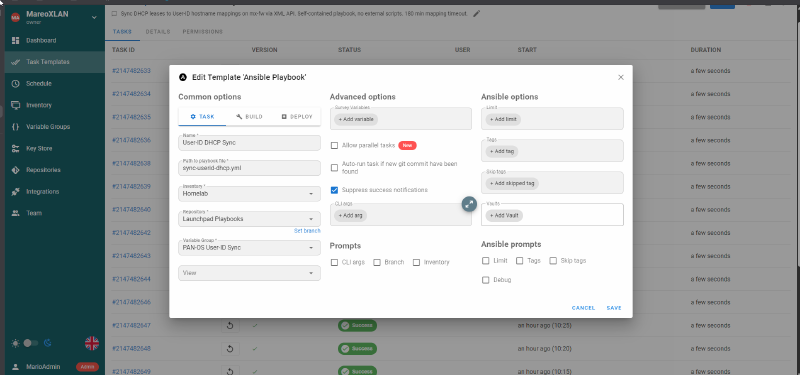
Semaphore edit template dialog showing the User-ID DHCP Sync configuration
Semaphore Template 33: playbook path, environment, inventory, and schedule configuration

The playbook is self-contained: it writes the full Python script inline (via ansible.builtin.copy), executes it, then cleans up the temp file. No git clone of the script needed. Credentials come from Semaphore’s encrypted environment variables.

Click to expand sync-userid-dhcp.yml (Ansible playbook)
 1
 2
 3
 4
 5
 6
 7
 8
 9
10
11
12
13
14
15
16
17
18
19
20
21
22
23
24
25
26
27
28
29
30
31
32
33
34
35
36
37
38
39
40
41
42
43
44
45
46
47
48
49
50
51
52
53
54
55
56
57
---
# Sync device identities to User-ID mappings on mx-fw
# Multi-source: Pi-hole A records + UniFi Controller + PAN-OS DHCP leases
#
# Schedule: every 5 minutes via Semaphore cron
# Timeout: mappings expire after 180 min, so missing a few runs is safe
#
# Semaphore environment must provide:
#   PANOS_API_KEY: mx-fw admin API key
#   UNIFI_USER: UniFi controller username
#   UNIFI_PASS: UniFi controller password
#   PANOS_HOST: <FIREWALL_IP> (optional, defaults to 192.168.10.1)
#   UNIFI_URL: https://<UNIFI_IP>:8443 (optional)

- name: Sync User-ID from DHCP + UniFi + static DNS
  hosts: localhost
  connection: local
  gather_facts: false

  tasks:
    - name: Verify API key is set
      ansible.builtin.fail:
        msg: "PANOS_API_KEY not set in Semaphore environment"
      when: lookup('env', 'PANOS_API_KEY') == ''

    - name: Write sync script
      ansible.builtin.copy:
        dest: /tmp/sync_userid_combined.py
        mode: "0755"
        content: |
          #!/usr/bin/env python3
          # Full Python script written inline here
          # (see the standalone script above for the complete source)
          # This version combines all 3 sources: static DNS,
          # UniFi Controller, and DHCP leases
          ...

    - name: Run sync script
      ansible.builtin.command:
        cmd: python3 /tmp/sync_userid_combined.py
      environment:
        PANOS_API_KEY: "{{ lookup('env', 'PANOS_API_KEY') }}"
        PANOS_HOST: "{{ lookup('env', 'PANOS_HOST') | default('192.168.10.1', true) }}"
        UNIFI_URL: "{{ lookup('env', 'UNIFI_URL') | default('https://192.168.30.140:8443', true) }}"
        UNIFI_USER: "{{ lookup('env', 'UNIFI_USER') | default('', true) }}"
        UNIFI_PASS: "{{ lookup('env', 'UNIFI_PASS') | default('', true) }}"
      register: sync_result
      changed_when: "'Pushed' in sync_result.stdout"

    - name: Show result
      ansible.builtin.debug:
        msg: "{{ sync_result.stdout_lines }}"

    - name: Cleanup temp script
      ansible.builtin.file:
        path: /tmp/sync_userid_combined.py
        state: absent

Key design choices:

  • The Python script is written to /tmp at runtime, not cloned from git (avoids SSH key management in Semaphore)
  • changed_when: "'Pushed' in sync_result.stdout" gives accurate change tracking in the Semaphore UI
  • Environment variables pass credentials without them ever touching disk
  • The playbook runs on localhost with connection: local since it only needs HTTPS access to the firewall and UniFi controller

Verifying It Works
#

After running the script, check the firewall:

1
2
3
4
# Via API (replace <FW> and <KEY>)
curl -sk "https://<FW>/api/?type=op&key=<KEY>\
&cmd=<show><user><ip-user-mapping>\
<all></all></ip-user-mapping></user></show>"

Or via CLI (SSH to firewall):

1
2
3
4
5
6
> show user ip-user-mapping all

IP              Vsys   User              Type     Timeout
192.168.10.128  vsys1  iphone            XMLAPI   180
192.168.30.240  vsys1  graylog           XMLAPI   180
172.30.50.77    vsys1  ring - front door XMLAPI   180

Check traffic logs (Monitor > Traffic): the “Source User” and “Destination User” columns now show device names.
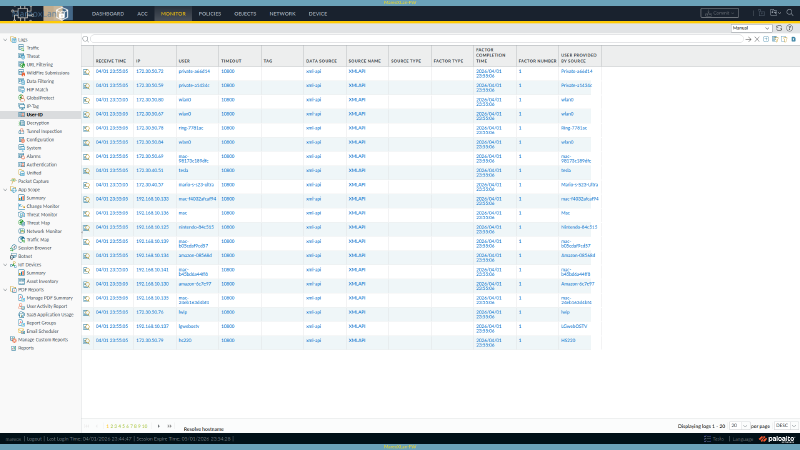
PAN-OS User-ID ip-user-mapping table showing 124 device mappings
Monitor > User-ID on mx-fw showing all 124 device-to-IP mappings pushed via XMLAPI


What I Evaluated and Rejected
#

Before building this, I researched every tool I could find:

ToolWhy I Skipped It
PacketFenceEnterprise NAC. Requires 16GB RAM, MariaDB, FreeRADIUS. Wants to be your DHCP server. No native PAN-OS User-ID integration. Massive overkill for device naming.
p0fPassive OS fingerprinting. Signature database last updated ~2012. Cannot identify modern iOS, Android, or Windows 11. Unmaintained.
FingerbankCloud API for device fingerprinting (by the PacketFence team). Interesting, but UniFi already does 80% of this for free. Free tier is 300 req/hour.
mDNS/Bonjour sniffingRequires a listener daemon on each VLAN. UniFi already catches most mDNS devices through its normal operation.
PAN-OS Device-IDMaps device type (e.g., “IP Camera”), not hostname. Requires a paid IoT Security subscription for full coverage. 0 entries without the license.
NetBIOS scanningWindows-only, active scanning, UDP 137. Marginal benefit when UniFi already has the data.

Extending the Script
#

The script is designed to be extended. Every source follows the same pattern:

 1
 2
 3
 4
 5
 6
 7
 8
 9
10
def get_my_new_source():
    """Return a list of dicts with ip, username, source keys."""
    mappings = []
    # ... query your source here ...
    mappings.append({
        "ip": "192.168.1.50",
        "username": "my-device",
        "source": "my-source",
    })
    return mappings

Then insert it at the right priority level in main(). The merge logic handles deduplication automatically (first source to claim an IP wins).

Ideas for additional sources: Wazuh agent list, Proxmox API (VM/LXC names to IPs), SNMP discovery (device sysName), or ARP table + reverse DNS.


Results
#

124 devices identified across 6 VLANs, zero pip dependencies.

SourceDevicesExamples
Pi-hole A records (static DNS)69graylog, sema, atlas, pve5, caddy
UniFi hostnames34LG_Smart_Fridge2_open, KP115, HS200
UniFi user-assigned names5Ring - Front Door, NAS-920-Eth1
UniFi OUI vendor fallback10Amazon-08568d, Tuya-5b4b03, Ring-7781ac
PAN-OS DHCP leases6tesla, Mario-s-S23-Ultra
Total124

The script is ~300 lines of Python using only the standard library (urllib, ssl, json, re, xml.etree). No pip install needed. Runs on any host with HTTPS access to your firewall.


Full Script
#

The complete script below is the DHCP-only version (no UniFi or static DNS). Add the other sources by following the sections above.

Click to expand sync_userid_dhcp.py (~150 lines)
  1
  2
  3
  4
  5
  6
  7
  8
  9
 10
 11
 12
 13
 14
 15
 16
 17
 18
 19
 20
 21
 22
 23
 24
 25
 26
 27
 28
 29
 30
 31
 32
 33
 34
 35
 36
 37
 38
 39
 40
 41
 42
 43
 44
 45
 46
 47
 48
 49
 50
 51
 52
 53
 54
 55
 56
 57
 58
 59
 60
 61
 62
 63
 64
 65
 66
 67
 68
 69
 70
 71
 72
 73
 74
 75
 76
 77
 78
 79
 80
 81
 82
 83
 84
 85
 86
 87
 88
 89
 90
 91
 92
 93
 94
 95
 96
 97
 98
 99
100
101
102
103
104
105
106
107
108
109
110
111
112
113
114
115
116
117
118
119
120
121
122
123
124
125
126
127
128
129
130
131
132
133
134
135
136
137
138
139
140
141
142
143
144
145
146
147
148
149
150
151
152
153
154
155
156
157
158
159
160
161
162
163
164
165
166
167
168
169
170
171
172
173
174
#!/usr/bin/env python3
"""
Sync DHCP leases to User-ID mappings on a PAN-OS firewall.

Usage:
    python3 sync_userid_dhcp.py              # Push DHCP mappings
    python3 sync_userid_dhcp.py --dry-run    # Preview without pushing
    python3 sync_userid_dhcp.py --verbose    # Show all mapping details

Requires: .env file with firewall-ip and admin-api-key,
          or PANOS_API_KEY and PANOS_HOST environment variables.
"""

import urllib.request
import urllib.parse
import ssl
import xml.etree.ElementTree as ET
import sys
import os


def load_env(path=".env"):
    """Parse a key=value .env file (supports hyphenated keys)."""
    env = {}
    if not os.path.exists(path):
        return env
    with open(path) as f:
        for line in f:
            line = line.strip()
            if "=" in line and not line.startswith("#"):
                k, v = line.split("=", 1)
                env[k] = v
    return env


def api_call(base_url, params, ctx):
    """Make a PAN-OS XML API call and return parsed XML root."""
    query = urllib.parse.urlencode(params)
    url = f"{base_url}?{query}"
    req = urllib.request.Request(url)
    resp = urllib.request.urlopen(req, context=ctx)
    return ET.fromstring(resp.read().decode())


def get_dhcp_leases(base_url, api_key, ctx):
    """Retrieve active DHCP leases from all firewall interfaces."""
    root = api_call(base_url, {
        "type": "op",
        "cmd": (
            "<show><dhcp><server><lease>"
            "<interface>all</interface>"
            "</lease></server></dhcp></show>"
        ),
        "key": api_key,
    }, ctx)

    leases = []
    for entry in root.findall(".//entry"):
        ip = entry.find("ip")
        hostname = entry.find("hostname")
        mac = entry.find("mac")
        state = entry.find("state")

        if ip is None:
            continue

        host_text = hostname.text if hostname is not None else None
        mac_text = mac.text if mac is not None else None
        state_text = state.text if state is not None else ""

        # Use hostname if available
        if host_text and host_text not in (
            "[Unavailable]", "", "none"
        ):
            username = host_text
        # Skip reserved entries without hostnames
        elif state_text == "reserved":
            continue
        # Fall back to MAC address
        elif mac_text:
            username = f"mac-{mac_text.replace(':', '')}"
        else:
            continue

        leases.append({"ip": ip.text, "username": username})
    return leases


def push_mappings(base_url, api_key, ctx, mappings,
                  timeout_min=180, batch_size=50):
    """Push User-ID mappings in batches to avoid HTTP 414."""
    for i in range(0, len(mappings), batch_size):
        batch = mappings[i:i + batch_size]
        entries = []
        for m in batch:
            # XML-escape special characters in usernames
            u = (
                m["username"]
                .replace("&", "&amp;")
                .replace("<", "&lt;")
                .replace(">", "&gt;")
                .replace('"', "&quot;")
            )
            entries.append(
                f'<entry name="{u}" ip="{m["ip"]}" '
                f'timeout="{timeout_min}"/>'
            )

        cmd = (
            "<uid-message>"
            "<version>2.0</version>"
            "<type>update</type>"
            "<payload><login>"
            + "".join(entries)
            + "</login></payload>"
            "</uid-message>"
        )

        root = api_call(base_url, {
            "type": "user-id",
            "cmd": cmd,
            "key": api_key,
        }, ctx)

        if root.get("status") != "success":
            print(
                f"ERROR: Batch {i // batch_size + 1} failed"
            )
            sys.exit(1)


def main():
    # Credentials: env vars (for cron/CI) or .env file (local)
    api_key = os.environ.get("PANOS_API_KEY")
    fw_ip = os.environ.get("PANOS_HOST", "192.168.10.1")

    if not api_key:
        env = load_env(os.path.join(
            os.path.dirname(os.path.abspath(__file__)),
            ".env",
        ))
        api_key = env["admin-api-key"]
        fw_ip = env.get("firewall-ip", "192.168.10.1")

    base_url = f"https://{fw_ip}/api/"
    ctx = ssl.create_default_context()
    ctx.check_hostname = False
    ctx.verify_mode = ssl.CERT_NONE

    dry_run = "--dry-run" in sys.argv
    verbose = "--verbose" in sys.argv

    print("Fetching DHCP leases...")
    leases = get_dhcp_leases(base_url, api_key, ctx)
    print(f"  Found: {len(leases)} mappable leases")

    if verbose:
        for m in sorted(leases, key=lambda x: x["ip"]):
            print(f"    {m['ip']:20s} -> {m['username']}")

    if not leases:
        print("No mappings to push.")
        return

    if dry_run:
        print(f"[DRY RUN] Would push {len(leases)} mappings")
    else:
        print(f"Pushing {len(leases)} mappings...")
        push_mappings(base_url, api_key, ctx, leases)
        print("  Success")


if __name__ == "__main__":
    main()

To add UniFi and static DNS sources, follow the sections above. The merge pattern is the same: query the source, add to the all_mappings dictionary (first IP wins), push the combined result.


Official Documentation References
#


Built on a PA-440 running PAN-OS 11.2.10-h2. Automated via Semaphore (every 5 min). Compatible with any PAN-OS firewall that has the XML API enabled.