The Problem # My PAN-OS firewall (GlobalProtect VPN portal at vpn.mareoxlan.com) needs a valid TLS certificate. I had a dedicated LXC (30122) running acme.sh with a Cloudflare DNS-01 challenge to issue a wildcard cert, then a PAN-OS deploy hook to push it to the firewall via the XML API. It worked, but it was a single-purpose VM doing the same job my Caddy reverse proxy already does – Caddy auto-renews *.mareoxlan.com via the same Cloudflare DNS-01 mechanism.
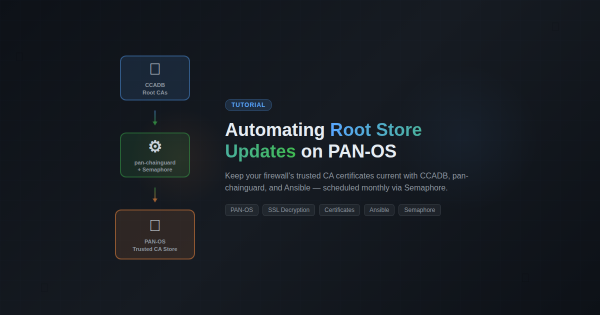
Overview # If you’re running SSL decryption on a Palo Alto firewall, you’ve probably hit this: a user reports they can’t access a website, and it turns out the site’s CA certificate isn’t in your firewall’s trusted root store. PAN-OS only updates its built-in root store on major software releases, which means between upgrades your firewall’s trust anchors slowly go stale.
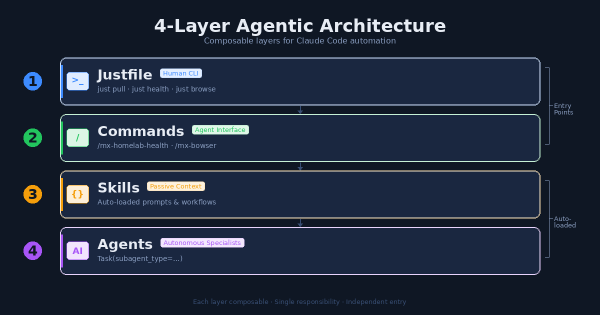
The Problem # After months of building Claude Code extensions (agents, skills, commands, hooks, MCP servers) I had a growing collection of powerful tools with no coherent entry point. Want to pull all repos? Run a shell script. Want to check infrastructure health? Ask Claude and hope it knows which command to use. Want to automate a browser task? Figure out whether to use the MCP plugin or write a script.
The Goal # Turn Claude Code from a stateless coding assistant into a persistent personal assistant — a second brain that remembers context across sessions, learns from daily work, and can semantically search past knowledge.
Inspired by Hermes’s personalization architecture, adapted for Claude Code’s native capabilities.
Hermes’s Approach (The Model) # Hermes creates personalization through:
The Goal # Add all 4 Proxmox VE cluster nodes (pve-mini2, pve-mini3, pve-mini5, pve-mini6) to the existing Prometheus/Grafana stack on LXC 30194. The monitoring stack already covered Graylog, Windows desktop, and PAN-OS firewall metrics – Proxmox was the last major gap.
Approach: pve-exporter vs node_exporter # I evaluated two options:
The Challenge # I’ve been running a homelab for years, constantly deploying new services, debugging issues, and learning from mistakes. Every time I solve a particularly gnarly problem or build something interesting, I think, “I should write this up.” And then I don’t.
The friction is real. By the time I finish a project—maybe deploying Wazuh XDR or migrating from Watchtower to WUD—I’m mentally done. The last thing I want to do is sit down and reconstruct what I did, sanitize my internal network details for public consumption, and format everything into a proper blog post. The motivation is there when I’m in the middle of solving a problem, but it evaporates the moment I’m done.
Why an XDR in a Homelab? # When I first started building out my homelab infrastructure, I fell into the same trap that catches most homelab enthusiasts: I assumed that being behind a firewall made me safe. After all, I wasn’t running a Fortune 500 network. I had VLANs, I had a next-generation firewall doing deep packet inspection, and I kept my systems patched. What more did I need?
Update, September 2026. Neither Watchtower nor WUD is the current update controller. Both were fully decommissioned in March 2026 after update-related outages; container updates are now Semaphore-managed (safe-update.sh, health-gated with soak and auto-rollback). This post is preserved as the historical migration account — including its NetBox dashboard walk-through, which reflects the IPAM tool of that era, not a current deployment.
The Problem # Watchtower had been my go-to for automatic Docker container updates across 8+ services. It worked… mostly. But I kept running into issues:
The Challenge # I needed a unified security monitoring solution that could:
Provide endpoint detection and response (XDR) capabilities Integrate with my existing Graylog centralized logging infrastructure Scale from a single-node deployment to multi-node if needed Work with my existing Hermes threat intelligence feeds The Solution # Wazuh Single-Node Stack # Deployed Wazuh as a Docker-based single-node stack. The single-node architecture includes:
The Problem # I noticed my Graylog VM was consuming more memory than expected. The VM has 4GB RAM allocated, but both Graylog and OpenSearch were competing for memory, leaving little headroom for the operating system’s filesystem cache.
What I Tried # First, I checked memory usage on the Graylog VM: