TL;DR # My technical blog was squeezing code blocks, tables, and ASCII diagrams into a 650px column designed for novel paragraphs. One CSS line fixed it. The real lesson: defaults optimized for one use case silently degrade another.
The Problem I Didn’t See # I’d been publishing posts for months. Tutorials with wide code blocks. Architecture posts with ASCII flow diagrams. Tables comparing tools and alternatives. Every single one was being crushed into 65ch — roughly 650 pixels of width.
TL;DR # A Python script that identifies every device on your network in PAN-OS traffic logs, without Active Directory. Combines Pi-hole DNS, UniFi Controller, and DHCP leases into one priority merge. 124 devices named on my PA-440.
Before:
1 2 3 192.168.10.128 → 8.8.8.8 user: unknown 192.168.30.240 → 1.1.1.1 user: unknown 172.30.50.77 → 52.26.132.60 user: unknown After:
The 2 AM Wake-Up Call # I woke up to find my CI/CD platform had been down for 8 hours. Semaphore, the Ansible automation engine that manages my entire homelab, was stuck in a crash loop:
1 2 3 /usr/local/bin/server-wrapper: line 295: syntax error: unexpected "&&" /usr/local/bin/server-wrapper: line 295: syntax error: unexpected "&&" /usr/local/bin/server-wrapper: line 295: syntax error: unexpected "&&" The same error, repeating every few seconds. The container would start, hit the broken entrypoint script, crash, and restart. Endlessly.
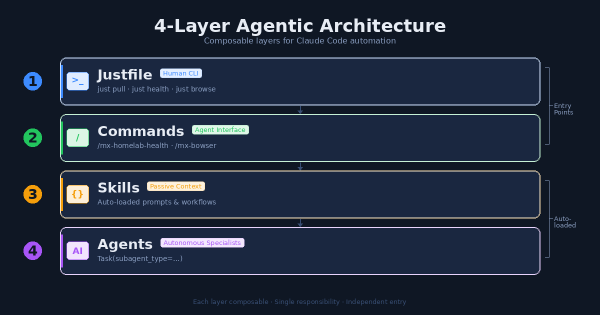
The Problem # After months of building Claude Code extensions – agents, skills, commands, hooks, MCP servers – I had a growing collection of powerful tools with no coherent entry point. Want to pull all repos? Run a shell script. Want to check infrastructure health? Ask Claude and hope it knows which command to use. Want to automate a browser task? Figure out whether to use the MCP plugin or write a script.
The Challenge # I’ve been running a homelab for years, constantly deploying new services, debugging issues, and learning from mistakes. Every time I solve a particularly gnarly problem or build something interesting, I think, “I should write this up.” And then I don’t.
The friction is real. By the time I finish a project—maybe deploying Wazuh XDR or migrating from Watchtower to WUD—I’m mentally done. The last thing I want to do is sit down and reconstruct what I did, sanitize my internal network details for public consumption, and format everything into a proper blog post. The motivation is there when I’m in the middle of solving a problem, but it evaporates the moment I’m done.
Why an XDR in a Homelab? # When I first started building out my homelab infrastructure, I fell into the same trap that catches most homelab enthusiasts: I assumed that being behind a firewall made me safe. After all, I wasn’t running a Fortune 500 network. I had VLANs, I had a next-generation firewall doing deep packet inspection, and I kept my systems patched. What more did I need?
The Problem # Watchtower had been my go-to for automatic Docker container updates across 8+ services. It worked… mostly. But I kept running into issues:
Opt-out model is dangerous - Watchtower watches ALL containers by default. I had to remember to add com.centurylinklabs.watchtower.enable=false to containers I didn’t want updated. Forgetting meant surprise updates.
No visibility - Updates happened silently at 4 AM. I only knew something updated when it broke. No dashboard, no easy way to see pending updates.
The Challenge # I needed a unified security monitoring solution that could:
Provide endpoint detection and response (XDR) capabilities Integrate with my existing Graylog centralized logging infrastructure Scale from a single-node deployment to multi-node if needed Work with my existing OpenClaw threat intelligence feeds The Solution # Wazuh Single-Node Stack # Deployed Wazuh as a Docker-based single-node stack. The single-node architecture includes:
The Challenge # I watched a YouTube video titled “I Stopped Using PowerPoint Once I Learned This Claude Method” that demonstrated creating presentations using HTML instead of PowerPoint. The approach was compelling: single HTML files that run in browsers, support full CSS animations, and can be deployed to GitHub Pages for instant sharing.
But here’s the thing - I already had a pptx skill installed that generates actual PowerPoint files. Should I replace it? Enhance it? Or build something new?
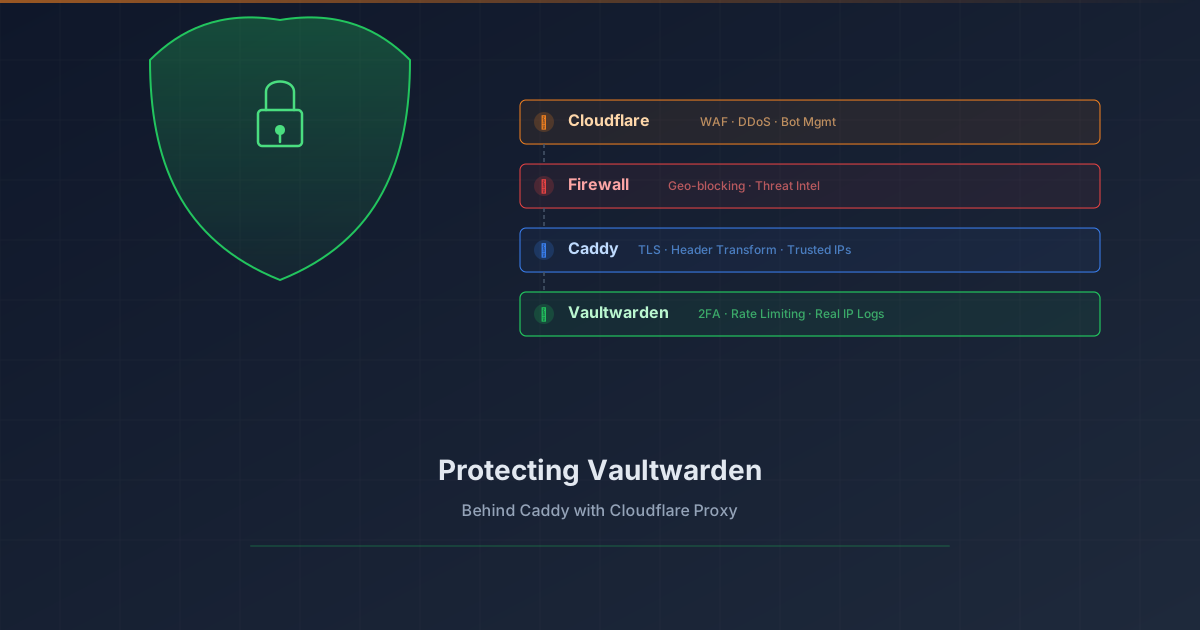
Overview # Your password vault is arguably the most sensitive service in your homelab. Exposing Vaultwarden to the internet requires layered protection. This tutorial shows how to add Cloudflare Proxy (WAF, DDoS protection, bot management) in front of Vaultwarden while preserving real client IP logging.
What you’ll achieve:
1 2 3 4 5 6 7 8 9 Client (real IP) ↓ Cloudflare Edge (WAF, DDoS, Bot protection) ↓ CF-Connecting-IP header Your Firewall (geo-blocking, threat intel) ↓ Caddy (extracts real IP, TLS termination) ↓ X-Real-IP header Vaultwarden (rate limiting, 2FA, logs real IP) Prerequisites # Vaultwarden already running behind Caddy reverse proxy Domain managed by Cloudflare (DNS) Caddy with valid TLS certificates (Let’s Encrypt/ACME) Basic understanding of reverse proxies The Problem # When you enable Cloudflare Proxy (orange cloud), traffic flows through Cloudflare’s edge servers before reaching your origin. This provides excellent protection, but introduces two challenges: