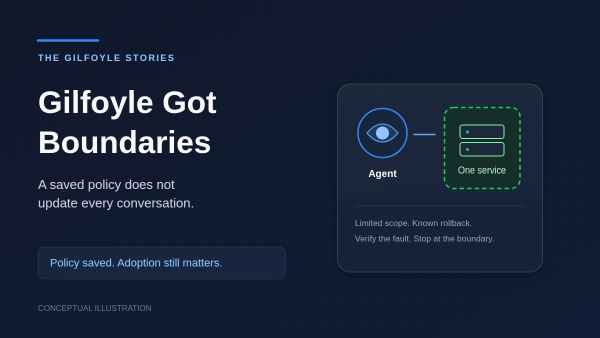
Changing my AI admin’s rules should have been straightforward: save the policy, deploy it, restart the gateway. Then I traced how an existing conversation restores its instructions: it can reuse its stored prompt instead of loading the new policy file. Apparently Gilfoyle had a way to keep outdated management instructions. Very on brand.
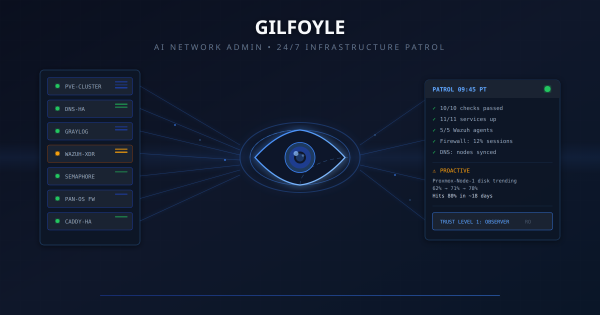
When I introduced Gilfoyle in April, he was an observer. He watched services, investigated alerts, and told me what broke. By October, his policy carried an Admin label. The interesting work became deciding exactly what that label allowed, then checking which conversations actually loaded those rules.
Most organizations can tell you whether their firewalls are healthy. Fewer can prove every allow rule is inspected, logged, owned, and still required.
The gap between those two things is where audits become painful. Multiple firewall admins, emergency changes at 2am, quarterly reviews that turn into archaeology digs, vendor access rules that were “temporary” in February and are still there in October. Nobody disabled them because nobody noticed they were still there. No alert fires when a rule that was supposed to be temporary quietly becomes permanent.
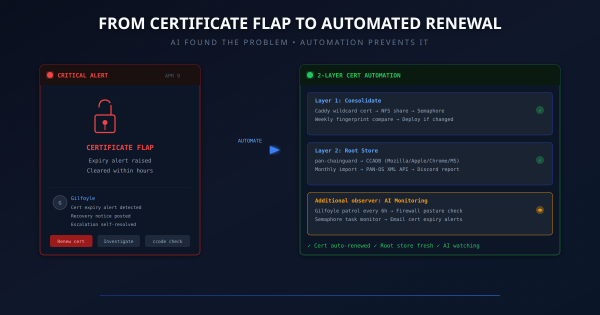
Update, October 14, 2026. This is the April certificate incident and the automation design that followed it. The monitoring schedules below describe that original setup, not a fresh verification of today’s jobs. Gilfoyle now has a Level 4 policy for bounded repairs, but the unattended controller remains inactive. A fresh Discord-route session loaded the new policy; warm sessions retained older prompts. The next chapter explains the rollout. It does not make certificate renewal an AI task.
Update, October 14, 2026. The patrols, capabilities, and trust ladder below describe Gilfoyle’s April rollout. A Level 4 policy now defines bounded authority for single-service repairs with a known rollback and fault-specific checks. The unattended controller remains inactive. Verification showed that a fresh session on the Discord route loaded the October 14 policy; already-warm sessions can retain their older prompts. The next chapter explains what changed and what still needs verification.
TL;DR # My technical blog was squeezing code blocks, tables, and ASCII diagrams into a 650px column designed for novel paragraphs. One CSS line fixed it. The real lesson: defaults optimized for one use case silently degrade another.
The Problem I Didn’t See # I’d been publishing posts for months. Tutorials with wide code blocks. Architecture posts with ASCII flow diagrams. Tables comparing tools and alternatives. Every single one was being crushed into 65ch — roughly 650 pixels of width.
TL;DR # A Python script that identifies every device on your network in PAN-OS traffic logs, without Active Directory. Combines Pi-hole DNS, UniFi Controller, and DHCP leases into one priority merge. 124 devices named on my PA-440.
Before:
1 2 3 192.168.10.128 → 8.8.8.8 user: unknown 192.168.30.240 → 1.1.1.1 user: unknown 172.30.50.77 → 52.26.132.60 user: unknown After:
The 2 AM Wake-Up Call # I woke up to find my CI/CD platform had been down for 8 hours. Semaphore, the Ansible automation engine that manages my entire homelab, was stuck in a crash loop:
1 2 3 /usr/local/bin/server-wrapper: line 295: syntax error: unexpected "&&" /usr/local/bin/server-wrapper: line 295: syntax error: unexpected "&&" /usr/local/bin/server-wrapper: line 295: syntax error: unexpected "&&" The same error, repeating every few seconds. The container would start, hit the broken entrypoint script, crash, and restart. Endlessly.
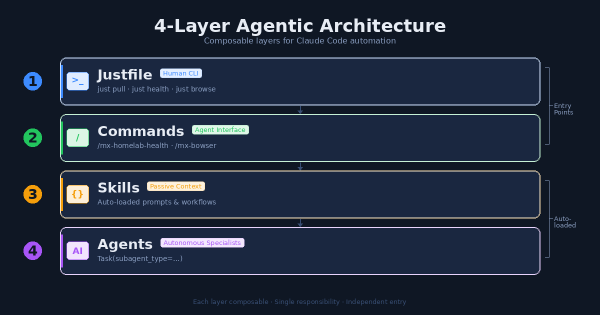
The Problem # After months of building Claude Code extensions (agents, skills, commands, hooks, MCP servers) I had a growing collection of powerful tools with no coherent entry point. Want to pull all repos? Run a shell script. Want to check infrastructure health? Ask Claude and hope it knows which command to use. Want to automate a browser task? Figure out whether to use the MCP plugin or write a script.
The Goal # Turn Claude Code from a stateless coding assistant into a persistent personal assistant — a second brain that remembers context across sessions, learns from daily work, and can semantically search past knowledge.
Inspired by Hermes’s personalization architecture, adapted for Claude Code’s native capabilities.
Hermes’s Approach (The Model) # Hermes creates personalization through:
The Challenge # I’ve been running a homelab for years, constantly deploying new services, debugging issues, and learning from mistakes. Every time I solve a particularly gnarly problem or build something interesting, I think, “I should write this up.” And then I don’t.
The friction is real. By the time I finish a project—maybe deploying Wazuh XDR or migrating from Watchtower to WUD—I’m mentally done. The last thing I want to do is sit down and reconstruct what I did, sanitize my internal network details for public consumption, and format everything into a proper blog post. The motivation is there when I’m in the middle of solving a problem, but it evaporates the moment I’m done.