Why an XDR in a Homelab? # When I first started building out my homelab infrastructure, I fell into the same trap that catches most homelab enthusiasts: I assumed that being behind a firewall made me safe. After all, I wasn’t running a Fortune 500 network. I had VLANs, I had a next-generation firewall doing deep packet inspection, and I kept my systems patched. What more did I need?
Update, September 2026. Neither Watchtower nor WUD is the current update controller. Both were fully decommissioned in March 2026 after update-related outages; container updates are now Semaphore-managed (safe-update.sh, health-gated with soak and auto-rollback). This post is preserved as the historical migration account — including its NetBox dashboard walk-through, which reflects the IPAM tool of that era, not a current deployment.
The Problem # Watchtower had been my go-to for automatic Docker container updates across 8+ services. It worked… mostly. But I kept running into issues:
The Challenge # I needed a unified security monitoring solution that could:
Provide endpoint detection and response (XDR) capabilities Integrate with my existing Graylog centralized logging infrastructure Scale from a single-node deployment to multi-node if needed Work with my existing Hermes threat intelligence feeds The Solution # Wazuh Single-Node Stack # Deployed Wazuh as a Docker-based single-node stack. The single-node architecture includes:
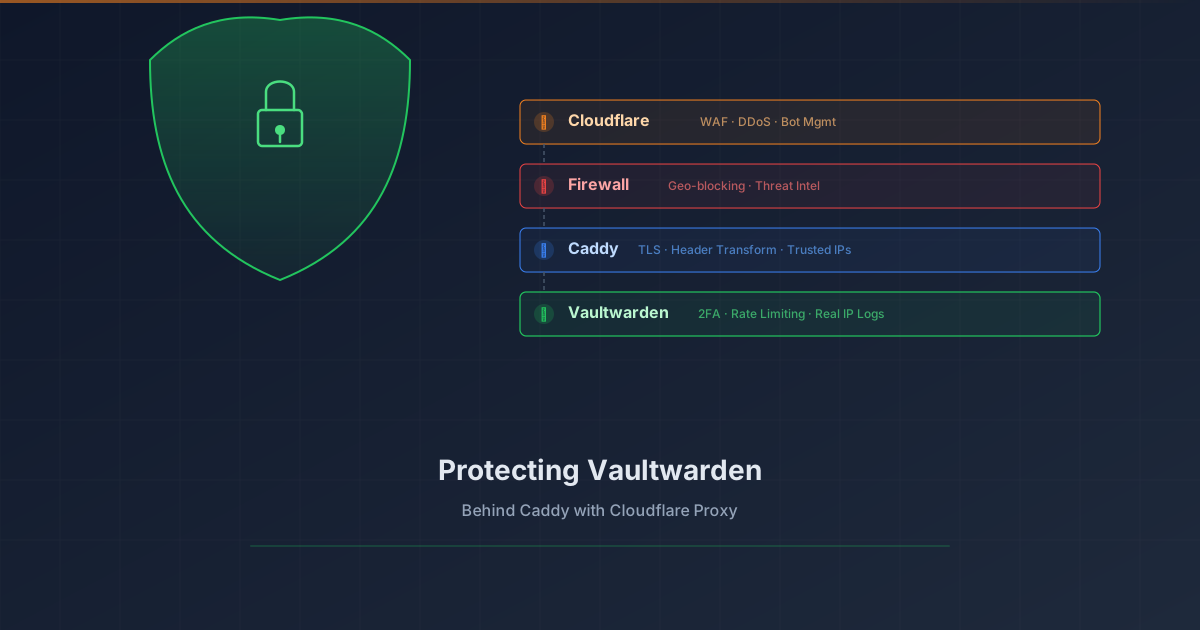
Overview # Your password vault is arguably the most sensitive service in your homelab. Exposing Vaultwarden to the internet requires layered protection. This tutorial shows how to add Cloudflare Proxy (WAF, DDoS protection, bot management) in front of Vaultwarden while preserving real client IP logging.
What you’ll achieve:
1 2 3 4 5 6 7 8 9 Client (real IP) ↓ Cloudflare Edge (WAF, DDoS, Bot protection) ↓ CF-Connecting-IP header Your Firewall (geo-blocking, threat intel) ↓ Caddy (extracts real IP, TLS termination) ↓ X-Real-IP header Vaultwarden (rate limiting, 2FA, logs real IP) Prerequisites # Vaultwarden already running behind Caddy reverse proxy Domain managed by Cloudflare (DNS) Caddy with valid TLS certificates (Let’s Encrypt/ACME) Basic understanding of reverse proxies The Problem # When you enable Cloudflare Proxy (orange cloud), traffic flows through Cloudflare’s edge servers before reaching your origin. This provides excellent protection, but introduces two challenges:
The Problem # I noticed my Graylog VM was consuming more memory than expected. The VM has 4GB RAM allocated, but both Graylog and OpenSearch were competing for memory, leaving little headroom for the operating system’s filesystem cache.
What I Tried # First, I checked memory usage on the Graylog VM: