TL;DR # A Python script that identifies every device on your network in PAN-OS traffic logs, without Active Directory. Combines Pi-hole DNS, UniFi Controller, and DHCP leases into one priority merge. 124 devices named on my PA-440.
Before:
1 2 3 192.168.10.128 → 8.8.8.8 user: unknown 192.168.30.240 → 1.1.1.1 user: unknown 172.30.50.77 → 52.26.132.60 user: unknown After:
The Problem: Six Interfaces for One Question # “Is anything broken in my homelab?”
Answering that question used to mean: SSH into Proxmox to check guest status. Curl the Pi-hole API for DNS health. Open Grafana to scan Prometheus alerts. Check Graylog for error spikes. Look at Semaphore for failed automation runs. Glance at Caddy logs for 502s.
The 2 AM Wake-Up Call # I woke up to find my CI/CD platform had been down for 8 hours. Semaphore, the Ansible automation engine that manages my entire homelab, was stuck in a crash loop:
1 2 3 /usr/local/bin/server-wrapper: line 295: syntax error: unexpected "&&" /usr/local/bin/server-wrapper: line 295: syntax error: unexpected "&&" /usr/local/bin/server-wrapper: line 295: syntax error: unexpected "&&" The same error, repeating every few seconds. The container would start, hit the broken entrypoint script, crash, and restart. Endlessly.
The Problem # My Caddy reverse proxy runs as an HA pair – two nodes behind a keepalived VIP. Every service in the homelab gets its traffic through this pair. The setup works great, except for one recurring failure mode: config drift.
The deployment process was manual: edit the Caddy site config in git, SCP it to both nodes, validate, reload. The “both nodes” part is where things break down. It’s easy to deploy to caddy1, test it, see it working, and then forget caddy2 exists. Until keepalived fails over and suddenly half your sites return 502s because the backup node has last week’s config.
The Problem # My PAN-OS firewall (GlobalProtect VPN portal at vpn.mareoxlan.com) needs a valid TLS certificate. I had a dedicated LXC (30122) running acme.sh with a Cloudflare DNS-01 challenge to issue a wildcard cert, then a PAN-OS deploy hook to push it to the firewall via the XML API. It worked, but it was a single-purpose VM doing the same job my Caddy reverse proxy already does – Caddy auto-renews *.mareoxlan.com via the same Cloudflare DNS-01 mechanism.
Automation is the backbone of my homelab. This wiki covers the tools, patterns, and workflows that keep 50+ services running with minimal manual intervention.
Automation Stack # n8n Workflow Automation # n8n is my primary workflow automation platform—think Zapier/Make but self-hosted with full code access.
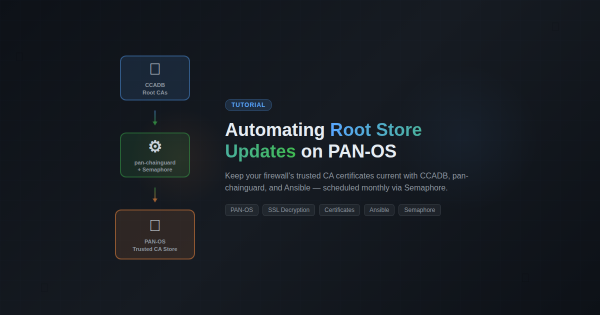
Overview # If you’re running SSL decryption on a Palo Alto firewall, you’ve probably hit this: a user reports they can’t access a website, and it turns out the site’s CA certificate isn’t in your firewall’s trusted root store. PAN-OS only updates its built-in root store on major software releases, which means between upgrades your firewall’s trust anchors slowly go stale.
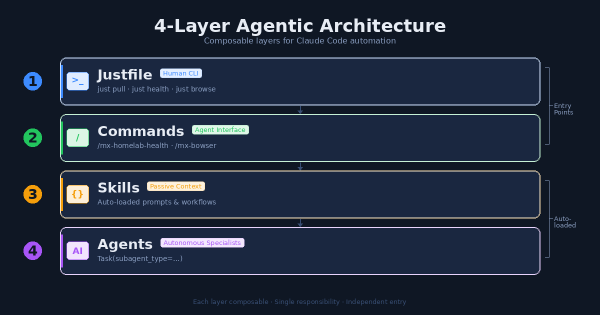
The Problem # After months of building Claude Code extensions – agents, skills, commands, hooks, MCP servers – I had a growing collection of powerful tools with no coherent entry point. Want to pull all repos? Run a shell script. Want to check infrastructure health? Ask Claude and hope it knows which command to use. Want to automate a browser task? Figure out whether to use the MCP plugin or write a script.
The Challenge # I’ve been running a homelab for years, constantly deploying new services, debugging issues, and learning from mistakes. Every time I solve a particularly gnarly problem or build something interesting, I think, “I should write this up.” And then I don’t.
The friction is real. By the time I finish a project—maybe deploying Wazuh XDR or migrating from Watchtower to WUD—I’m mentally done. The last thing I want to do is sit down and reconstruct what I did, sanitize my internal network details for public consumption, and format everything into a proper blog post. The motivation is there when I’m in the middle of solving a problem, but it evaporates the moment I’m done.
The Problem # Watchtower had been my go-to for automatic Docker container updates across 8+ services. It worked… mostly. But I kept running into issues:
Opt-out model is dangerous - Watchtower watches ALL containers by default. I had to remember to add com.centurylinklabs.watchtower.enable=false to containers I didn’t want updated. Forgetting meant surprise updates.
No visibility - Updates happened silently at 4 AM. I only knew something updated when it broke. No dashboard, no easy way to see pending updates.