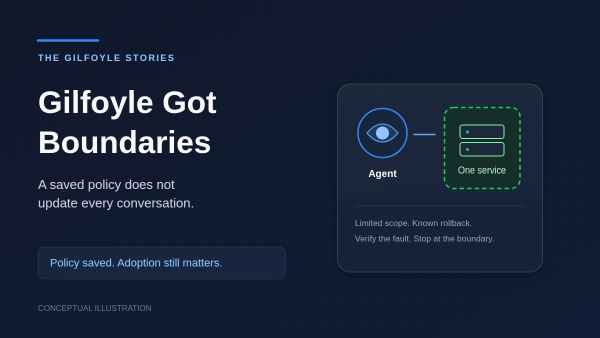
Changing my AI admin’s rules should have been straightforward: save the policy, deploy it, restart the gateway. Then I traced how an existing conversation restores its instructions: it can reuse its stored prompt instead of loading the new policy file. Apparently Gilfoyle had a way to keep outdated management instructions. Very on brand.
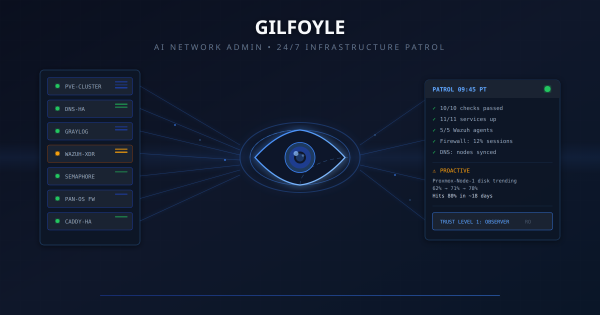
When I introduced Gilfoyle in April, he was an observer. He watched services, investigated alerts, and told me what broke. By October, his policy carried an Admin label. The interesting work became deciding exactly what that label allowed, then checking which conversations actually loaded those rules.
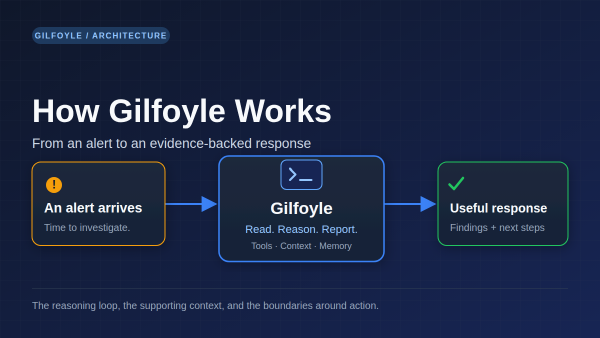
An infrastructure alert lands in Discord. Turning it into a useful response takes more than adding an LLM: something has to decide whether the message belongs in the queue, collect evidence, preserve the incident context, and know when to stop.
That is the machinery around Gilfoyle. The original introduction covered the April rollout. This is the current system, checked on October 15: how a signal reaches him, how he investigates, and which parts run without asking a model anything.
AI-augmented homelab operations, from multi-agent orchestration to automated content pipelines. This wiki documents how Claude Code and agentic patterns accelerate infrastructure work.
4-Layer Agentic Architecture # A framework for organizing AI-assisted automation into composable layers:
Building a 4-Layer Agentic Architecture for Claude Code: Justfile, Commands, Skills, and Agents, where each layer has a single responsibility Skill Development # The Skills layer outgrew a folder of one-off scripts. It is now a curated collection of 60+ skills with a shared prefix: journaling, homelab health checks, code mentoring, adversarial review, and build-plan generation. Skills live in a central configuration repo and deploy to every machine via symlink, so a skill written on the laptop shows up in the homelab session an hour later.
Most organizations can tell you whether their firewalls are healthy. Fewer can prove every allow rule is inspected, logged, owned, and still required.
The gap between those two things is where audits become painful. Multiple firewall admins, emergency changes at 2am, quarterly reviews that turn into archaeology digs, vendor access rules that were “temporary” in February and are still there in October. Nobody disabled them because nobody noticed they were still there. No alert fires when a rule that was supposed to be temporary quietly becomes permanent.
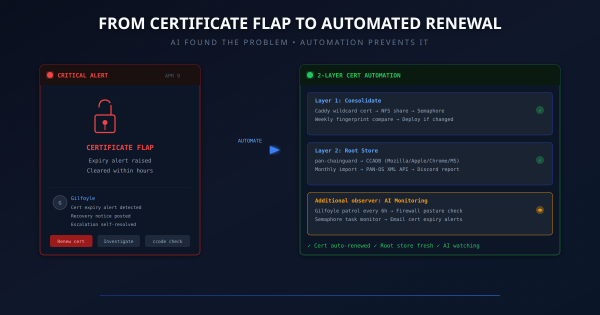
Update, October 14, 2026. This is the April certificate incident and the automation design that followed it. The monitoring schedules below describe that original setup, not a fresh verification of today’s jobs. Gilfoyle now has a Level 4 policy for bounded repairs, but the unattended controller remains inactive. A fresh Discord-route session loaded the new policy; warm sessions retained older prompts. The next chapter explains the rollout. It does not make certificate renewal an AI task.
Update, October 14, 2026. The patrols, capabilities, and trust ladder below describe Gilfoyle’s April rollout. A Level 4 policy now defines bounded authority for single-service repairs with a known rollback and fault-specific checks. The unattended controller remains inactive. Verification showed that a fresh session on the Discord route loaded the October 14 policy; already-warm sessions can retain their older prompts. The next chapter explains what changed and what still needs verification.
TL;DR # A Python script that identifies every device on your network in PAN-OS traffic logs, without Active Directory. Combines Pi-hole DNS, UniFi Controller, and DHCP leases into one priority merge. 124 devices named on my PA-440.
Before:
1 2 3 192.168.10.128 → 8.8.8.8 user: unknown 192.168.30.240 → 1.1.1.1 user: unknown 172.30.50.77 → 52.26.132.60 user: unknown After:
Correction, September 2026. This post originally described the server as wrapping 9 services with 32 tools, including a confirmation-gated write surface and plans for an SSE transport. The maintained server is simpler and stricter than that: local stdio plus a CLI, up to 25 read-only tools across 10 configured backends, and 15 documentation resources. There are no write tools and no remote transport. Lifecycle changes (provisioning, DNS records, container updates) are owned by Semaphore automation, and the IPAM backend is now Nautobot — NetBox is retained rollback-only. The sections below have been rewritten to describe the current architecture; the original narrative is preserved where it explains the design decisions that still hold.
The 2 AM Wake-Up Call # I woke up to find my CI/CD platform had been down for 8 hours. Semaphore, the Ansible automation engine that manages my entire homelab, was stuck in a crash loop:
1 2 3 /usr/local/bin/server-wrapper: line 295: syntax error: unexpected "&&" /usr/local/bin/server-wrapper: line 295: syntax error: unexpected "&&" /usr/local/bin/server-wrapper: line 295: syntax error: unexpected "&&" The same error, repeating every few seconds. The container would start, hit the broken entrypoint script, crash, and restart. Endlessly.
The Problem # My Caddy reverse proxy runs as an HA pair – two nodes behind a keepalived VIP. Every service in the homelab gets its traffic through this pair. The setup works great, except for one recurring failure mode: config drift.
The deployment process was manual: edit the Caddy site config in git, SCP it to both nodes, validate, reload. The “both nodes” part is where things break down. It’s easy to deploy to caddy1, test it, see it working, and then forget caddy2 exists. Until keepalived fails over and suddenly half your sites return 502s because the backup node has last week’s config.