The Problem: Six Interfaces for One Question # “Is anything broken in my homelab?”
Answering that question used to mean: SSH into Proxmox to check guest status. Curl the Pi-hole API for DNS health. Open Grafana to scan Prometheus alerts. Check Graylog for error spikes. Look at Semaphore for failed automation runs. Glance at Caddy logs for 502s.
The Problem # After months of building Claude Code extensions – agents, skills, commands, hooks, MCP servers – I had a growing collection of powerful tools with no coherent entry point. Want to pull all repos? Run a shell script. Want to check infrastructure health? Ask Claude and hope it knows which command to use. Want to automate a browser task? Figure out whether to use the MCP plugin or write a script.
The Challenge # I watched a YouTube video titled “I Stopped Using PowerPoint Once I Learned This Claude Method” that demonstrated creating presentations using HTML instead of PowerPoint. The approach was compelling: single HTML files that run in browsers, support full CSS animations, and can be deployed to GitHub Pages for instant sharing.
But here’s the thing - I already had a pptx skill installed that generates actual PowerPoint files. Should I replace it? Enhance it? Or build something new?
AI-augmented homelab operations — from multi-agent orchestration to automated content pipelines. This wiki documents how Claude Code and agentic patterns accelerate infrastructure work.
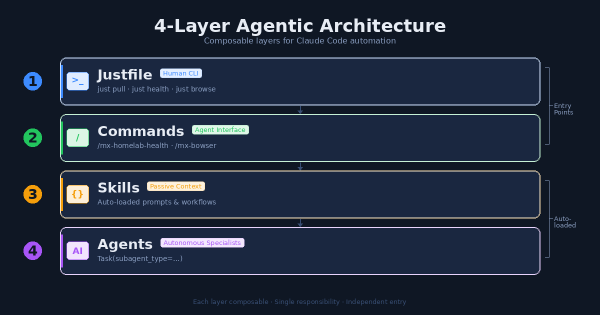
4-Layer Agentic Architecture # A framework for organizing AI-assisted automation into composable layers:
4-Layer Agentic Architecture — Justfile → Commands → Skills → Agents: how each layer has a single responsibility Skill Development # Building custom Claude Code skills for repeatable workflows: