Overview#
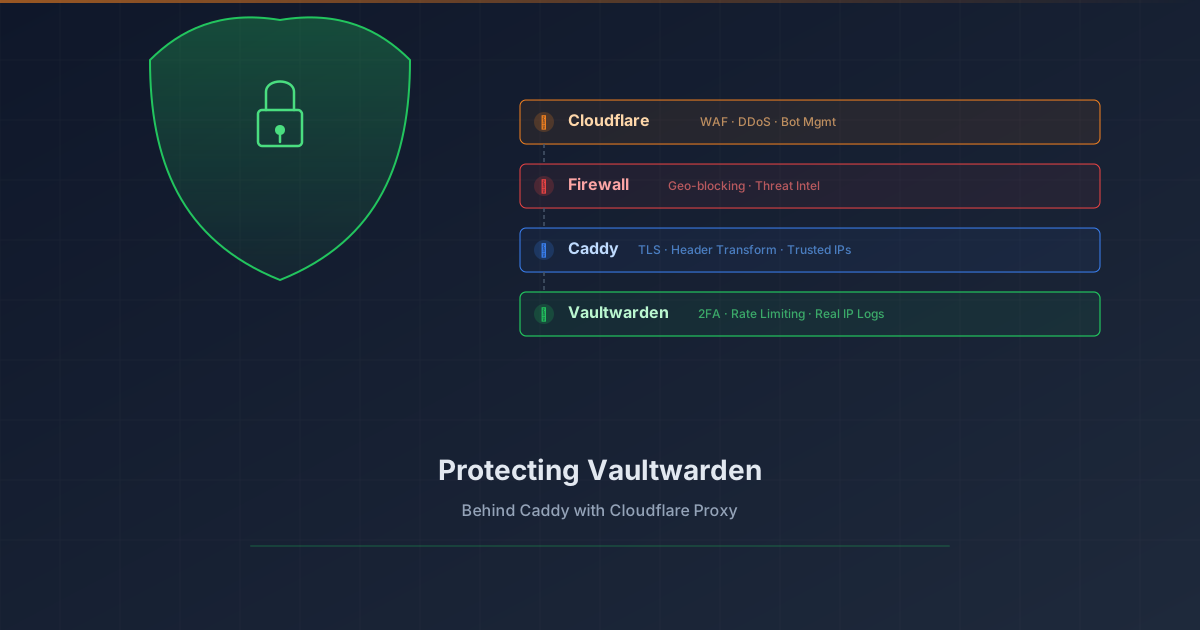
Your password vault is arguably the most sensitive service in your homelab. Exposing Vaultwarden to the internet requires layered protection. This tutorial shows how to add Cloudflare Proxy (WAF, DDoS protection, bot management) in front of Vaultwarden while preserving real client IP logging.
What you’ll achieve:
| |
Prerequisites#
- Vaultwarden already running behind Caddy reverse proxy
- Domain managed by Cloudflare (DNS)
- Caddy with valid TLS certificates (Let’s Encrypt/ACME)
- Basic understanding of reverse proxies
The Problem#
When you enable Cloudflare Proxy (orange cloud), traffic flows through Cloudflare’s edge servers before reaching your origin. This provides excellent protection, but introduces two challenges:
- SSL handshake fails if Cloudflare tries HTTP to your origin
- Real client IPs are hidden — your logs show Cloudflare’s edge IP instead
Step 1: Enable Cloudflare Proxy#
In your Cloudflare dashboard:
- Go to DNS → Find your Vaultwarden subdomain
- Toggle the cloud icon from gray (DNS only) to orange (Proxied)
At this point, you’ll likely see ERR_SSL_PROTOCOL_ERROR. Don’t panic — Step 2 fixes this.
Step 2: Set SSL/TLS Mode to Full#
This is the most common gotcha. Cloudflare’s default “Flexible” mode tries to connect to your origin via HTTP port 80, but Caddy redirects HTTP → HTTPS, causing a protocol mismatch.
- Go to SSL/TLS → Overview
- Change encryption mode to Full or Full (strict)
| Mode | Behavior | Use When |
|---|---|---|
| Flexible | CF → Origin via HTTP | ❌ Breaks with HTTPS origins |
| Full | CF → Origin via HTTPS (any cert) | ✅ Self-signed certs |
| Full (strict) | CF → Origin via HTTPS (valid cert) | ✅ Best with Let’s Encrypt |
Since Caddy gets real certificates from Let’s Encrypt, use Full (strict) for maximum security.
Step 3: Configure Caddy to Trust Cloudflare IPs#
Add Cloudflare’s IP ranges to your Caddyfile global config so Caddy knows to look for real client IPs in headers:
| |
Get current ranges from: https://www.cloudflare.com/ips/
Step 4: Forward Real Client IP to Vaultwarden#
Here’s the second major gotcha. The typical Caddy pattern uses {remote_host}:
| |
When traffic comes through Cloudflare, {remote_host} is Cloudflare’s edge server IP (e.g., 162.158.x.x), not your actual client.
The fix: Use Cloudflare’s header directly:
| |
Cloudflare always sends the real client IP in CF-Connecting-IP.
Step 5: Configure Vaultwarden to Read the Header#
Add this environment variable to your Vaultwarden configuration:
| |
Now Vaultwarden will log the real client IP from the header Caddy forwarded.
Step 6: Enable Vaultwarden Security Settings#
While you’re hardening, add these security settings:
| |
Verification#
Test 1: Access Works#
| |
Test 2: Real IP Logging#
- Access Vaultwarden from your phone on cellular (not WiFi)
- Check Vaultwarden logs:
1podman logs vaultwarden | grep -i login - The logged IP should be your phone’s cellular IP, not a Cloudflare IP (104.x.x.x, 162.158.x.x, 172.64.x.x)
Troubleshooting#
| Symptom | Cause | Fix |
|---|---|---|
ERR_SSL_PROTOCOL_ERROR | SSL mode is Flexible | Change to Full or Full (strict) |
Logs show 162.158.x.x | Using {remote_host} | Change to {header.CF-Connecting-IP} |
| 520/521/522 errors | Origin unreachable | Check firewall allows Cloudflare IPs |
| 525 SSL handshake failed | Cert issue at origin | Verify Caddy has valid certs |
What I Learned#
Gotcha 1: SSL Mode Matters#
Cloudflare’s “Flexible” mode is a trap for homelabs. It assumes your origin only speaks HTTP, which made sense in 2010. With modern reverse proxies that auto-provision HTTPS, always use Full or Full (strict).
Gotcha 2: Caddy Placeholders Are Tricky#
The difference between {remote_host} and {header.CF-Connecting-IP} isn’t obvious. The naming suggests remote_host is the remote client, but it’s actually the immediate connection — which is Cloudflare when proxied.
Gotcha 3: Mixed Proxy Configurations#
If some domains use Cloudflare Proxy (orange cloud) and others don’t (gray cloud), you need different header configurations:
- Orange cloud domains:
{header.CF-Connecting-IP} - Gray cloud / internal domains:
{remote_host}
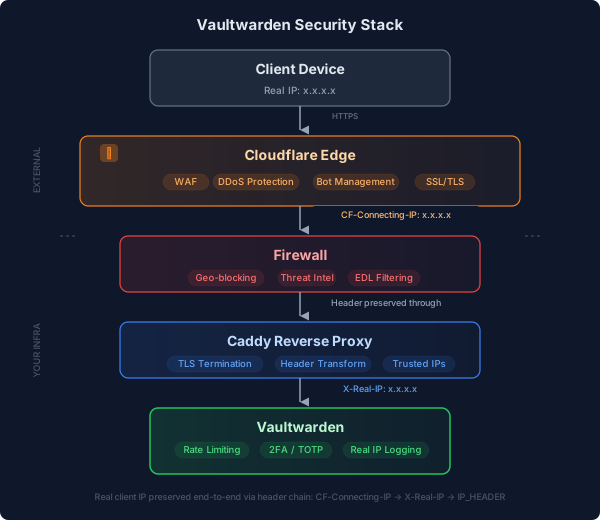
Architecture Diagram#
Final Security Stack#
| Layer | Protection | Status |
|---|---|---|
| Cloudflare | WAF, DDoS, Bot management | ✅ |
| Firewall | Geo-blocking, threat intel EDLs | ✅ |
| Vaultwarden | 2FA (TOTP/WebAuthn) | ✅ |
| Vaultwarden | Login rate limiting | ✅ |
| Vaultwarden | Public signups disabled | ✅ |
| Vaultwarden | Real IP logging | ✅ |
Why Not Cloudflare Zero Trust?#
You might wonder why we didn’t use Cloudflare Access (Zero Trust) instead. The answer: mobile apps.
Bitwarden/Vaultwarden mobile apps need to sync in the background. Cloudflare Access requires interactive authentication through a browser, which breaks app sync. Use Zero Trust for browser-only services, not password managers.