Automation
Table of Contents

Automation is the backbone of my homelab. This wiki covers the tools, patterns, and workflows that keep 50+ services running with minimal manual intervention.
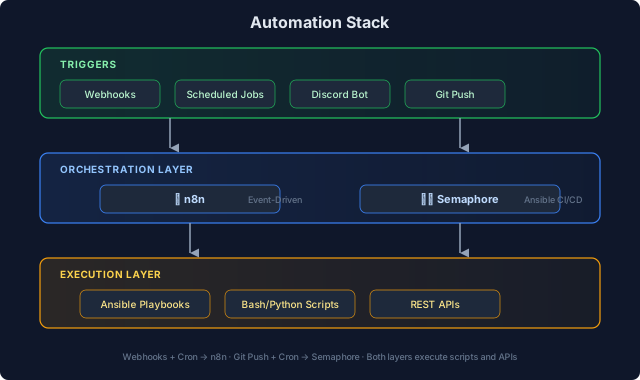
Automation Stack#
n8n Workflow Automation#
n8n is my primary workflow automation platform—think Zapier/Make but self-hosted with full code access.
Active Workflows#
| Workflow | Trigger | Purpose |
|---|---|---|
| Proxmox Monitor | Webhook (Discord bot) | AI-assisted cluster management |
| UniFi Reports | Schedule (weekly) | Network device inventory reports |
| Meeting Notes | Webhook | Transcription and summarization |
| Service Alerts | Webhook | Route alerts to appropriate channels |
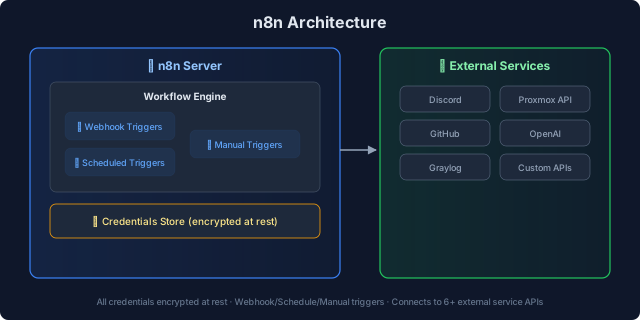
n8n Architecture#
Workflow Patterns#
1. Event → Process → Notify
| |
2. Fan-Out/Fan-In
| |
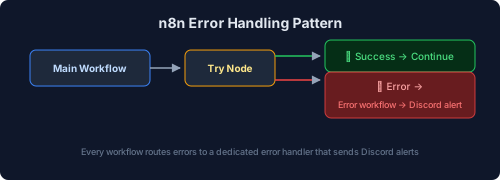
3. Error Handling
Discord Bot Integration#
A Discord bot forwards DMs and @mentions to n8n webhooks, enabling conversational automation:
| |
Use cases:
- “Check Proxmox cluster status”
- “List running VMs on node 3”
- “Show recent Graylog alerts”
Semaphore CI/CD#
Semaphore is my Ansible automation platform—a web UI for running playbooks with scheduling and audit logging.
Active Playbooks#
| Category | Playbooks | Purpose |
|---|---|---|
| Caddy Management | add-domain, remove-domain, list-domains | Reverse proxy automation |
| Power Management | night-sleep, day-on | Proxmox cluster power scheduling |
| Maintenance | update-containers, backup-verify | Routine maintenance tasks |
Caddy Domain Automation#
Instead of SSH’ing to both Caddy nodes manually, Semaphore playbooks handle domain management:
Add Domain:
- Input: domain name, backend IP, port
- Playbook generates Caddy config snippet
- Deploys to BOTH nodes (prevents config drift)
- Validates with
caddy validate - Reloads Caddy
Remove Domain:
- Input: domain name
- Playbook removes from both nodes
- Validates and reloads
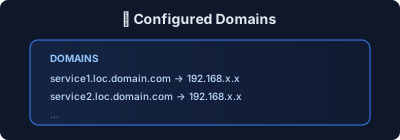
List Domains:
Power Management Automation#
Scheduled playbooks manage Proxmox cluster power:
| Schedule | Playbook | Action |
|---|---|---|
| 11 PM | night-sleep | Shutdown non-essential VMs/LXCs |
| 7 AM | day-on | Wake up daytime services |
Why automate power?
- Reduce electricity costs
- Extend hardware lifespan
- Lower heat output
- Essential services (DNS, proxy, backups) stay running 24/7
Important gotcha: Semaphore’s cron scheduler ignores the container’s TZ variable. Must set SEMAPHORE_SCHEDULE_TIMEZONE explicitly.
Scripting Standards#
Bash Scripts#
All bash scripts follow these conventions:
| |
Validation:
shellcheckfor lintingshfmtfor formatting- Tested on both Ubuntu and Debian
Python Scripts#
For complex automation, Python with type hints:
| |
Tooling:
rufffor lintingmypyfor type checkinguvfor fast package management
Backup Automation#
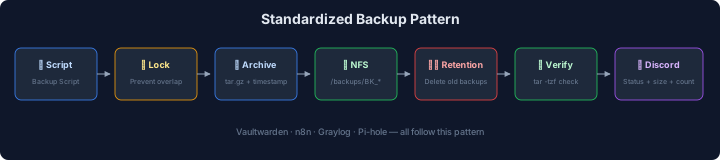
Standardized backup pattern across services:
Services with automated backups:
- Vaultwarden (password manager)
- n8n workflows
- Graylog configuration
- Pi-hole settings
Infrastructure as Code#
Git-Based Deployment#
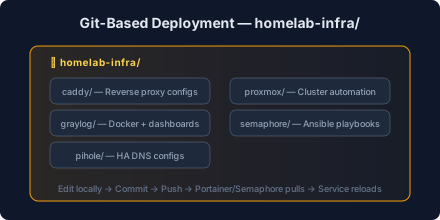
All configurations live in Git repositories:
Deployment flow:
- Edit config locally
- Commit and push
- Portainer/Semaphore pulls changes
- Service reloads
Portainer GitOps#
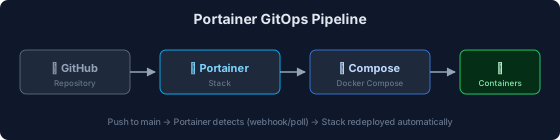
Docker Compose stacks deploy via Portainer’s Git integration:
Update process:
- Push to main branch
- Portainer detects change (webhook or poll)
- Stack redeployed automatically
WUD (What’s Up Docker) Update Monitoring#
All Docker services include WUD for opt-in update monitoring (replaced Watchtower):
| |
Key difference from Watchtower: WUD uses an opt-in model — only containers with wud.watch=true are monitored. WUD notifies about available updates but does not auto-update, giving you control over when to apply changes.
Key settings:
WATCHBYDEFAULT=false: Only watch labeled containers (opt-in)- Discord notifications when new versions are available
- Web UI dashboard showing update status across all services
Notification Patterns#
Discord Webhook Embeds#
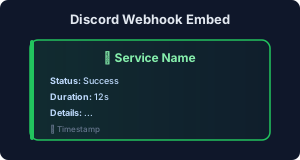
All automation sends Discord notifications with consistent formatting:
Color coding:
- 🟢 Green: Success
- 🟡 Yellow: Warning
- 🔴 Red: Error/Fault
Shoutrrr Integration#
WUD and other services use Shoutrrr for notifications:
| |
Lessons Learned#
1. Idempotency is Non-Negotiable#
Every script must be safe to run multiple times:
- Check before creating (
id -u userbeforeuseradd) - Use
--ignore-existingflags where available - Test with
set -eto catch hidden failures
2. Timezone Chaos#
Different tools handle timezones differently:
- Docker: Uses host timezone or
TZenv var - Cron: Uses container timezone
- Semaphore: Has its OWN
SEMAPHORE_SCHEDULE_TIMEZONE
Always set timezone explicitly. Default: America/Los_Angeles.
3. Lock Files Prevent Disasters#
Long-running scripts need lock files:
| |
Without this, cron overlap caused corrupted backups.
4. Validate Before Deploy#
Every deployment includes validation:
docker compose config --quietbefore deploycaddy validatebefore reloadbash -n script.shbefore execution
Related Pages#
- Infrastructure - Where automation runs
- Observability - Automation observability
- Networking - Caddy and DNS automation