↓ Skip to main content
>_
Homelab Journal // Network Security Engineer
  1. Wiki/

Automation

Automation Pipeline

Automation is the backbone of my homelab. This wiki covers the tools, patterns, and workflows that keep 50+ services running with minimal manual intervention.

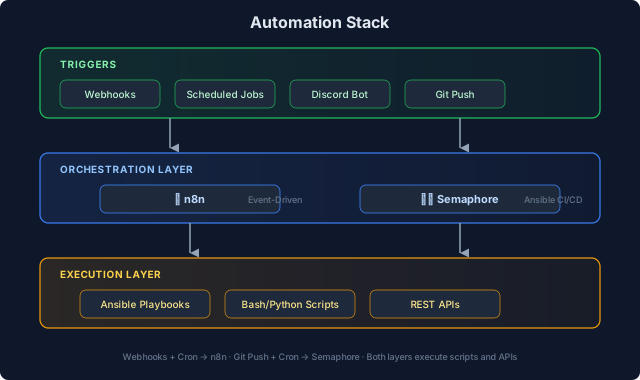
Automation Stack
#

Automation stack showing triggers, orchestration, and execution layers

n8n Workflow Automation
#

n8n is my primary workflow automation platform—think Zapier/Make but self-hosted with full code access.

Active Workflows
#

WorkflowTriggerPurpose
Proxmox MonitorWebhook (Discord bot)AI-assisted cluster management
UniFi ReportsSchedule (weekly)Network device inventory reports
Meeting NotesWebhookTranscription and summarization
Service AlertsWebhookRoute alerts to appropriate channels

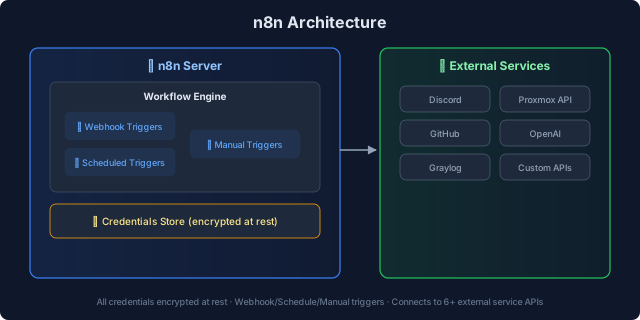
n8n Architecture
#

n8n architecture with workflow engine, credentials store, and external services

Workflow Patterns
#

1. Event → Process → Notify

1
2
3
4
5
Trigger (webhook/schedule)
         ↓
Process data (HTTP requests, code nodes)
         ↓
Notify (Discord, email, webhook)

2. Fan-Out/Fan-In

1
2
3
4
5
6
7
8
9
    Single trigger
         ↓
Split to parallel branches
         ↓
 Process independently
         ↓
     Merge results
         ↓
     Final action

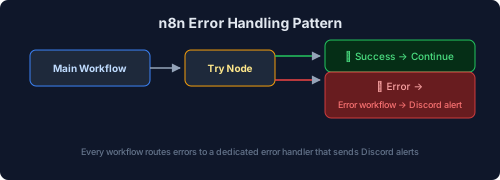
3. Error Handling

n8n error handling pattern with try node routing to success or Discord alert

Discord Bot Integration
#

A Discord bot forwards DMs and @mentions to n8n webhooks, enabling conversational automation:

1
2
3
4
5
6
7
8
9
   Discord @mention
          ↓
Discord Bot (LXC container)
          ↓
      n8n Webhook
          ↓
AI Processing (Claude API)
          ↓
  Response → Discord

Use cases:

  • “Check Proxmox cluster status”
  • “List running VMs on node 3”
  • “Show recent Graylog alerts”

Semaphore CI/CD
#

Semaphore is my Ansible automation platform—a web UI for running playbooks with scheduling and audit logging.

Active Playbooks
#

CategoryPlaybooksPurpose
Caddy Managementadd-domain, remove-domain, list-domainsReverse proxy automation
Power Managementnight-sleep, day-onProxmox cluster power scheduling
Maintenanceupdate-containers, backup-verifyRoutine maintenance tasks

Caddy Domain Automation
#

Instead of SSH’ing to both Caddy nodes manually, Semaphore playbooks handle domain management:

Add Domain:

  1. Input: domain name, backend IP, port
  2. Playbook generates Caddy config snippet
  3. Deploys to BOTH nodes (prevents config drift)
  4. Validates with caddy validate
  5. Reloads Caddy

Remove Domain:

  1. Input: domain name
  2. Playbook removes from both nodes
  3. Validates and reloads

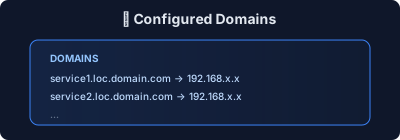
List Domains:

List of configured domains managed by Semaphore

Power Management Automation
#

Scheduled playbooks manage Proxmox cluster power:

SchedulePlaybookAction
11 PMnight-sleepShutdown non-essential VMs/LXCs
7 AMday-onWake up daytime services

Why automate power?

  • Reduce electricity costs
  • Extend hardware lifespan
  • Lower heat output
  • Essential services (DNS, proxy, backups) stay running 24/7

Important gotcha: Semaphore’s cron scheduler ignores the container’s TZ variable. Must set SEMAPHORE_SCHEDULE_TIMEZONE explicitly.

Scripting Standards
#

Bash Scripts
#

All bash scripts follow these conventions:

1
2
3
4
5
#!/usr/bin/env bash
set -euo pipefail  # Exit on error, undefined vars, pipe failures

# Trap for cleanup
trap 'echo "Error on line $LINENO"; exit 1' ERR

Validation:

  • shellcheck for linting
  • shfmt for formatting
  • Tested on both Ubuntu and Debian

Python Scripts
#

For complex automation, Python with type hints:

 1
 2
 3
 4
 5
 6
 7
 8
 9
10
11
12
13
14
#!/usr/bin/env python3
"""Script description."""

from pathlib import Path
import argparse
import logging

def main() -> int:
    """Entry point."""
    ...
    return 0

if __name__ == "__main__":
    raise SystemExit(main())

Tooling:

  • ruff for linting
  • mypy for type checking
  • uv for fast package management

Backup Automation
#

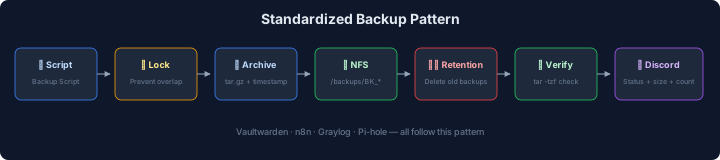
Standardized backup pattern across services:

Standardized backup pattern: script, lock, archive, NFS, retention, verify, Discord

Services with automated backups:

  • Vaultwarden (password manager)
  • n8n workflows
  • Graylog configuration
  • Pi-hole settings

Infrastructure as Code
#

Git-Based Deployment
#

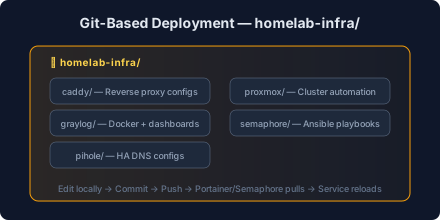
All configurations live in Git repositories:

Infrastructure as Code repository structure

Deployment flow:

  1. Edit config locally
  2. Commit and push
  3. Portainer/Semaphore pulls changes
  4. Service reloads

Portainer GitOps
#

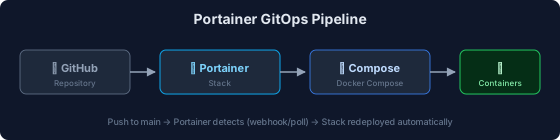
Docker Compose stacks deploy via Portainer’s Git integration:

Portainer GitOps pipeline: GitHub → Portainer → Compose → Containers

Update process:

  1. Push to main branch
  2. Portainer detects change (webhook or poll)
  3. Stack redeployed automatically

WUD (What’s Up Docker) Update Monitoring
#

All Docker services include WUD for opt-in update monitoring (replaced Watchtower):

1
2
3
4
5
6
7
8
9
wud:
  image: getwud/wud:latest
  environment:
    - WUD_WATCHER_LOCAL_WATCHBYDEFAULT=false
    - WUD_TRIGGER_DISCORD_URL=discord://<WEBHOOK_ID>/<WEBHOOK_TOKEN>
  volumes:
    - /var/run/docker.sock:/var/run/docker.sock
  labels:
    - wud.watch=true

Key difference from Watchtower: WUD uses an opt-in model — only containers with wud.watch=true are monitored. WUD notifies about available updates but does not auto-update, giving you control over when to apply changes.

Key settings:

  • WATCHBYDEFAULT=false: Only watch labeled containers (opt-in)
  • Discord notifications when new versions are available
  • Web UI dashboard showing update status across all services

Notification Patterns
#

Discord Webhook Embeds
#

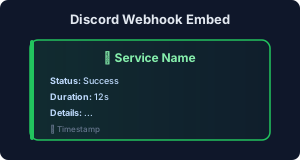
All automation sends Discord notifications with consistent formatting:

Discord webhook embed with status, duration, and timestamp

Color coding:

  • 🟢 Green: Success
  • 🟡 Yellow: Warning
  • 🔴 Red: Error/Fault

Shoutrrr Integration
#

WUD and other services use Shoutrrr for notifications:

1
discord://<webhook_id>/<webhook_token>?color=5793266&title=ServiceName

Lessons Learned
#

1. Idempotency is Non-Negotiable
#

Every script must be safe to run multiple times:

  • Check before creating (id -u user before useradd)
  • Use --ignore-existing flags where available
  • Test with set -e to catch hidden failures

2. Timezone Chaos
#

Different tools handle timezones differently:

  • Docker: Uses host timezone or TZ env var
  • Cron: Uses container timezone
  • Semaphore: Has its OWN SEMAPHORE_SCHEDULE_TIMEZONE

Always set timezone explicitly. Default: America/Los_Angeles.

3. Lock Files Prevent Disasters
#

Long-running scripts need lock files:

1
2
3
LOCK_FILE="/var/lock/backup.lock"
exec 9>"$LOCK_FILE"
flock -n 9 || { echo "Already running"; exit 1; }

Without this, cron overlap caused corrupted backups.

4. Validate Before Deploy
#

Every deployment includes validation:

  • docker compose config --quiet before deploy
  • caddy validate before reload
  • bash -n script.sh before execution

Related Pages#

2026

Architecture: Caddy GitOps Auto-Deploy

Overview # After multiple outages caused by configuration drift between two HA Caddy reverse proxy nodes, I built a GitOps pipeline that automatically deploys configs to both nodes whenever changes are pushed to the main branch. Config drift is now impossible by design. The problem: Two Caddy nodes in a keepalived HA pair need identical configs. Forgetting to deploy to the second node after editing a site config caused service outages — twice in the same week.

2025

Architecture: Homelab Journal Site Structure

Overview # This site uses a hybrid content structure that combines the best of wikis and blogs. Instead of choosing between “everything chronological” or “everything by topic,” we get both: Wiki sections for evergreen reference content (organized by topic) Blog posts for journey updates and lessons learned (organized by date) Tutorials for step-by-step guides (standalone, searchable) Series for multi-part deep dives (linked learning paths) Content Architecture #