Networking
Table of Contents

My homelab network is segmented into 5 VLANs with a multi-tier DNS architecture and high-availability reverse proxy. This wiki covers the design decisions and implementation details.
Complete Network Topology#
VLAN Design#
| VLAN | Subnet | Purpose | Key Services | Security Level |
|---|---|---|---|---|
| 10 | 192.168.10.0/24 | Management & Core | NAS, DNS HA, KVM devices | 🔒 High |
| 30 | 192.168.30.0/24 | Server Network | Proxmox, Docker, Apps | ⚙️ Medium |
| 40 | 172.30.40.0/24 | Isolated Services | Restricted access | 🔸 Low |
| 50 | 172.30.50.0/24 | IoT Devices | Smart home | 📱 Minimal |
| 254 | 10.254.254.0/24 | Firewall Management | Out-of-band mgmt | 🔐 Critical |
Design principle: Servers (VLAN 30) can reach management (VLAN 10), but management devices are protected from server-initiated connections. IoT devices are fully isolated—they cannot initiate connections to any other VLAN.
DNS Architecture#
Multi-Tier Design#
The DNS stack uses a three-tier architecture for performance, redundancy, and ad-blocking:
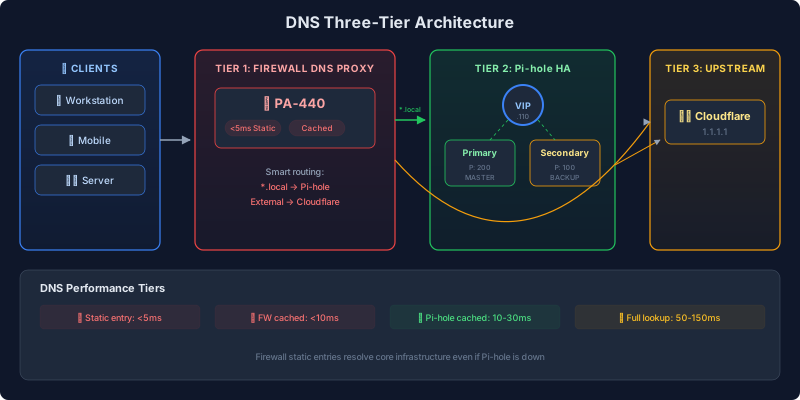
DNS Performance Tiers#
| Query Type | Response Time | Path |
|---|---|---|
| 🚀 Firewall static entry | <5ms | Direct from PA-440 cache |
| ⚡ Firewall cached | <10ms | PA-440 → cached response |
| 💨 Pi-hole cached | 10-30ms | PA-440 → Pi-hole → cached |
| 🌐 Uncached (full lookup) | 50-150ms | Full DNS resolution chain |
Layer 1: Firewall DNS Proxy#
The Palo Alto firewall provides the first DNS layer:
| Feature | Benefit |
|---|---|
| Caching | Sub-10ms response for repeated queries |
| Static Entries | Core infrastructure resolves instantly (<5ms) |
| Domain Routing | Local domains → Pi-hole, external → Cloudflare |
| DHCP Integration | All VLANs receive firewall as DNS server |
Static entries include Proxmox nodes, NAS devices, and firewall interfaces—services that must resolve even if Pi-hole is down.
Layer 2: Pi-hole HA#
Two Pi-hole instances with automatic failover:
| Component | Description |
|---|---|
| Primary | Priority 200, handles all queries normally |
| Secondary | Priority 100, takes over on primary failure |
| Virtual IP | Floating IP that firewall DNS proxy targets |
| Technology | keepalived (VRRP) |
Failover timing:
- Health check interval: 5 seconds
- Failures before failover: 3 consecutive
- Recovery Time Objective: ~15 seconds
Health checks verify:
- FTL service is running
- Port 53 is listening
- DNS queries resolve (tests dns.google, cloudflare)
Layer 3: Upstream DNS#
Pi-hole forwards to Cloudflare for external resolution:
- Primary: Firewall (which uses Cloudflare)
- Fallback: Direct to Cloudflare 1.1.1.2
High-Availability Architecture#
Three critical services run as HA pairs using keepalived VRRP:
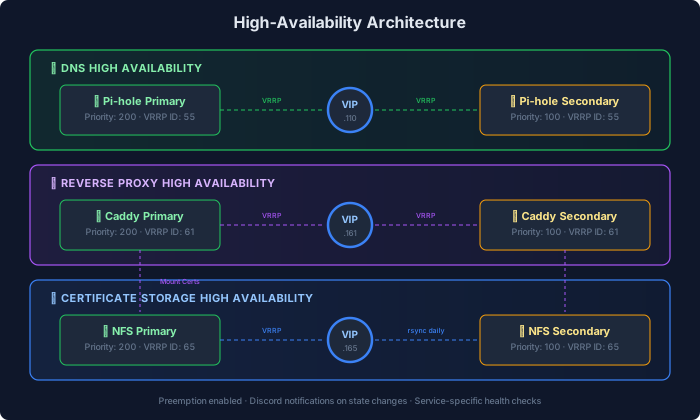
| Service | Primary | Secondary | VIP | VRRP ID | Failover Time |
|---|---|---|---|---|---|
| DNS | Pi-hole 1 | Pi-hole 2 | .110 | 55 | ~15 seconds |
| Reverse Proxy | Caddy 1 | Caddy 2 | .161 | 61 | ~10 seconds |
| Cert Storage | NFS 1 | NFS 2 | .165 | 65 | ~10 seconds |
Key settings:
- Preemption: Enabled (primary reclaims VIP on recovery)
- Notifications: Discord webhooks on state changes
- Health checks: Service-specific validation before accepting traffic
Reverse Proxy Architecture#
Dual-Proxy Design#
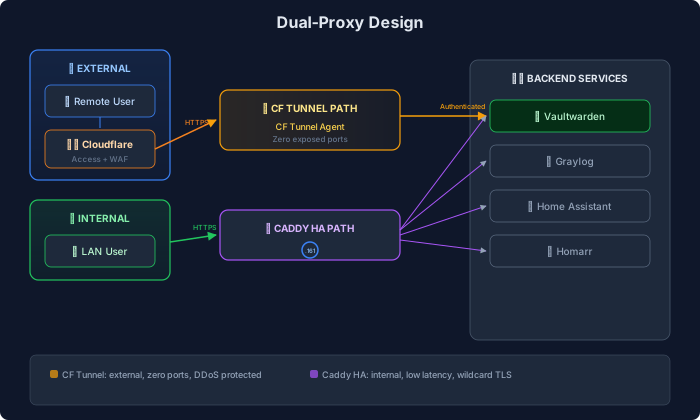
| Proxy | Purpose | Auth | Use Case |
|---|---|---|---|
| Cloudflare Tunnel | External access | Cloudflare Access | Public-facing services |
| Caddy HA | Internal + direct external | None (service-level) | Internal services, high-throughput |
Cloudflare Tunnel Path#
Benefits:
- Zero exposed firewall ports (outbound-only)
- DDoS protection included
- User identity via Cloudflare Access
- Automatic TLS termination
Protected services: Password manager, VPN management, media server.
Caddy HA Path#
Benefits:
- No external dependency
- Lower latency for internal traffic
- Full control over TLS certificates
- Wildcard cert via DNS-01 challenge
Domain Tiers#
| Pattern | Example | Purpose | TLS |
|---|---|---|---|
*.local | service.homelab.local | Direct backend access | None |
*.loc.domain.com | service.loc.domain.com | Internal TLS | Wildcard cert |
*.domain.com | service.domain.com | External via Cloudflare | Cloudflare |
Firewall Architecture#
Palo Alto Networks PA-440#
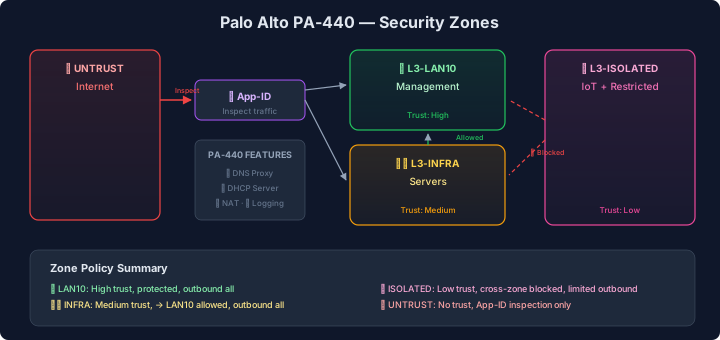
| Feature | Usage |
|---|---|
| App-ID | Application-aware traffic inspection |
| DNS Proxy | Intelligent caching and routing |
| DHCP Server | Centralized IP assignment for all VLANs |
| NAT | Destination/source translation for services |
| Zone Security | VLAN-based access policies |
| Logging | All traffic to Graylog via Syslog TCP |
Security Zones#
| Zone | VLANs | Trust Level | Outbound | Cross-Zone |
|---|---|---|---|---|
| L3-LAN10 | 10 | 🔒 High | ✅ All | Protected |
| L3-INFRA | 30 | ⚙️ Medium | ✅ All | → LAN10 only |
| L3-ISOLATED | 40, 50 | 🔸 Low | ✅ Limited | ❌ Blocked |
| L3-UNTRUST | - | ❌ None | N/A | Inspect only |
Network Monitoring#
UniFi Controller#
Manages all network hardware:
- UniFi Gateway (inter-VLAN routing)
- 24-port managed switch (USW-24-G2)
- 2 WiFi 6 access points (U6-LR, U6-Pro)
Monitoring features:
- Real-time client list
- Bandwidth per device
- DPI (Deep Packet Inspection) stats
- Anomaly detection
Pi.Alert Network Scanner#
Scans subnets every 5 minutes for:
- New device detection
- MAC address tracking
- Port scanning
- Vendor lookup
Lessons Learned#
1. Multi-Tier DNS Saves the Day#
When Pi-hole crashed due to database pressure, the firewall’s static entries kept core infrastructure resolving. Without this layer, Proxmox nodes couldn’t reach each other.
2. Config Drift Kills HA#
The Caddy HA pair once drifted out of sync when I updated only one node. The VIP failed over to the outdated node, breaking several services. Always deploy to BOTH nodes.
3. VRRP ID Collisions#
Each HA pair needs a unique VRRP ID. When I accidentally reused ID 55 for both DNS and NFS, one pair’s failover broke the other. Now I track IDs in documentation.
4. Health Checks Need Redundancy#
Early Pi-hole health checks tested only one upstream. If that upstream was slow, the check failed and triggered unnecessary failover. Now checks test multiple targets with fallback.
Related Pages#
- Infrastructure - Where DNS and proxy containers run
- Observability - Log shipping and alerting
- Automation - Network automation via Semaphore
There are no articles to list here yet.