
Overview#
When running a self-hosted password manager like Vaultwarden, accurate client IP logging is critical for security alerts. The “New Device Login” email should show the actual IP address of whoever just accessed your vault—not your reverse proxy’s internal IP.
This becomes tricky when you have multiple traffic paths: external users coming through Cloudflare Tunnel, and internal users coming through your local reverse proxy. Each path uses different mechanisms to communicate the real client IP.
This post documents the architecture I use to solve this: unified IP headers across both traffic paths.
The Problem#
After migrating Vaultwarden’s external access from Cloudflare Proxy (orange cloud DNS) to Cloudflare Tunnel with direct backend routing, my “New Device Login” alerts started showing the tunnel container’s IP instead of the real client IP.
Before (broken):
| |
After (fixed):
| |
Architecture#
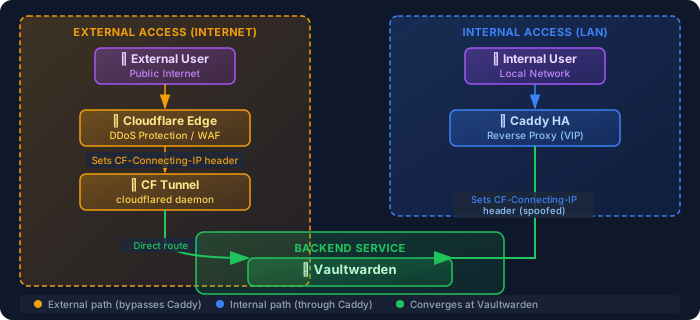
I use a dual-path architecture where external and internal traffic take completely different routes:
Why Direct Tunnel Routing?#
The key design decision: CF Tunnel routes directly to Vaultwarden, bypassing Caddy.
Why?
Resilience: Password manager is critical infrastructure. If Caddy has issues (NFS mount failure, configuration drift, etc.), Vaultwarden stays accessible externally.
Fewer dependencies: Each additional component in the chain is a potential failure point.
Performance: One less network hop for external requests.
The trade-off is complexity in IP header handling, which this architecture solves.
The IP Header Strategy#
The Challenge#
| Traffic Path | Header Source | Original Header |
|---|---|---|
| External (CF Tunnel) | Cloudflare Edge | CF-Connecting-IP |
| Internal (Caddy) | Caddy | X-Real-IP |
Vaultwarden only reads one header name via its IP_HEADER environment variable. Two different headers = inconsistent IP logging.
The Solution#
Standardize on CF-Connecting-IP for both paths.
External traffic already has this header set by Cloudflare. For internal traffic, configure Caddy to set the same header:
| |
Then configure Vaultwarden to read it:
| |
Now both paths use identical header logic.
Security Considerations#
Trust Boundaries#
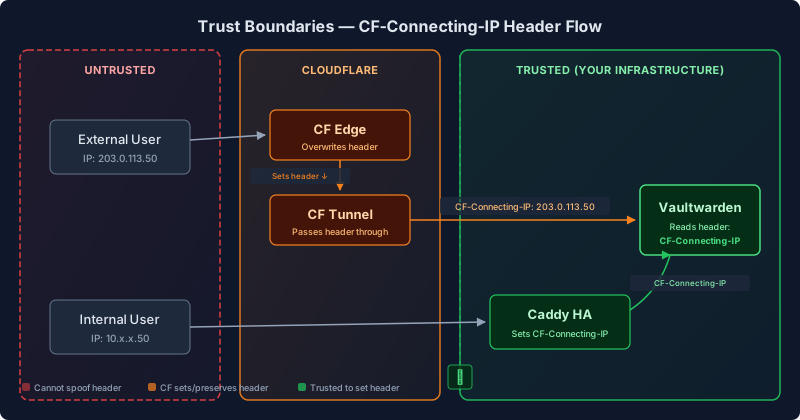
Only trusted components should set the CF-Connecting-IP header:
- Cloudflare Edge: Overwrites any incoming
CF-Connecting-IPheader (prevents spoofing) - Your reverse proxy: Only receives traffic from trusted sources
External requests cannot spoof this header because:
- Cloudflare overwrites it at the edge
- Direct access to Vaultwarden is blocked at the firewall
- The tunnel only accepts authenticated Cloudflare traffic
Why This Matters for Password Managers#
Accurate IP logging enables:
- Login alerts: Know where access attempts originate
- Audit trails: Security investigations need real IPs
- Rate limiting: Per-client-IP rate limits actually work
- Future geo-blocking: Block entire regions if needed
Failover Behavior#
The architecture provides independent failover for each path:
| Failure | External Impact | Internal Impact |
|---|---|---|
| CF Tunnel down | Fails over to replica (<10s) | None |
| Caddy down | None | Fails over via VRRP (~2s) |
| Both Caddy nodes down | None | Internal access down |
This is the key benefit: critical external access doesn’t depend on your reverse proxy.
Rollback Plan#
If issues arise, the previous configuration is documented inline:
| |
Uncomment the previous lines and restart services to revert.
Key Takeaways#
- Direct routing for critical services: Don’t chain your password manager through unnecessary proxies
- Unified headers: Pick one header name and configure all traffic paths to use it
- Trust boundaries matter: Only let trusted components set client IP headers
- Document rollback: Keep previous config commented for emergency reversion
- Test from external: Always verify IP logging works from outside your network
What I’d Do Differently#
Nothing major, but I’d:
- Add this header unification to my standard service onboarding checklist
- Consider documenting the CF Tunnel routing decisions earlier (I discovered the direct routing was in place only when debugging)